
[ 엘라스틱 서치 바이블 ] 공부한 후 정리한 내용 입니다!!!
3. 애널라이저와 토크나이저
- 애널라이저는 ( 캐릭터필터 >= 0 ), ( 토크나이저 = 1 ), ( 토큰 필터 >= 0 ) 로 구성
- 캐릭터 필터 >>> 토크나이저 >>> 토큰 필터 순서로 동작 수행
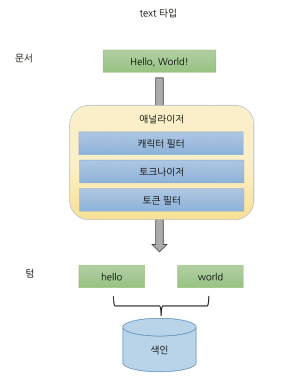
(3-1) analyze API : 애널라이저 동작 테스트 하는 api
### _analyze 사용
curl -XGET "http://192.168.56.10:9200/_analyze?pretty" -H "Content-Type: application/json" -d \
'{
  "analyzer": "standard",
  "text": "Hello, HELLO, World!"
}'

>>> "Hello, HELLO, World!" standard 애널라이저 분석 결과 확인
>>> 최종 hello, hello, world 토큰으로 쪼개짐 확인 가능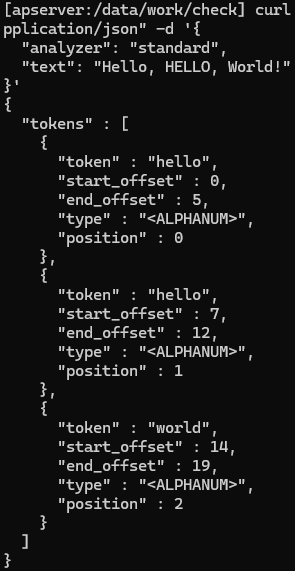
(3-2) 캐릭터 필터 : 텍스트를 받아 문자 추가, 변경, 삭제
- 애널라이저는 0개 이상 캐릭터 필터 지정 가능 ( 여러개 지정시 순차적 실행 )
es 내장 캐릭터 필터

### 캐릭터 필터 테스트
curl -XGET "http://192.168.56.10:9200/_analyze?pretty" -H "Content-Type: application/json" -d \
'{
"char_filter": ["html_strip"],
"text": "<p>I'm so <b>happy</b>!</p>"
}'
>>> <p> 는 줄바꿈 치환, <b> 는 제거, ' 는 홀따음표로 디코딩 됨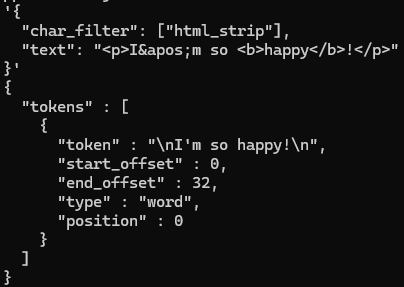
(3-3) 토크나이저 : 캐릭터 스트림은 받아 여러 토큰으로 쪼갬
- 애널라이저는 한 개의 토크나이저만 지정 가능
standard 토크나이저
- 기본 토크나이저
- 텍스트를 단어 단위 나눔
keyword 토크나이저
- 텍스트를 쪼개지 않고 내보냄 ( 단일 토큰 )
### keyword 토크나이저 테스트
curl -XGET "http://192.168.56.10:9200/_analyze?pretty" -H "Content-Type: application/json" -d \
'{
  "tokenizer": "keyword",
  "text": "Hello, HELLO, World!"
}'
ngram 토크나이저
- 텍스트를 min_gram, max_gram 단위로 쪼갬
- token_chars 속성을 통해 토큰에 포함시킬 타입 문자 지정
- rdb "like" 유사한 검색 구현시, 자동 완성 관련 서비스 구현 시 활용


### ngram 토크나이저 테스트
curl -XGET "http://192.168.56.10:9200/_analyze?pretty" -H "Content-Type: application/json" -d \
'{
  "tokenizer": {
    "type": "ngram", "min_gram": 3, "max_gram": 4
  },
  "text": "Hello, World!"
}'
>>> 21개 토큰으로 쪼개짐 ( 의미없는 토큰도 포함 )

curl -XGET "http://192.168.56.10:9200/_analyze?pretty" -H "Content-Type: application/json" -d \
'{
  "tokenizer": {
    "type": "ngram", "min_gram": 3, "max_gram": 4, "token_chars": ["letter"]
  },
  "text": "Hello, World!"
}'
>>> 10개 토큰으로 쪼개짐 ( 글자로 분류되는 문자만 )
edge_ngram 토크나이저
- ngram 과 유사하지만 모든 토큰의 시작 글자를 단어 시작 글자로 고정 시켜 생성함
### edge_nagram 토크나이저 테스트
curl -XGET "http://192.168.56.10:9200/_analyze?pretty" -H "Content-Type: application/json" -d \
'{
  "tokenizer": {
    "type": "edge_ngram", "min_gram": 3, "max_gram": 4, "token_chars": ["letter"]
  },
  "text": "Hello, World!"
}'
letter 토크나이저 : 언어로 분류되는 문자가 아닌 문자시 쪼갬 ( 공백, 특수문자 )
whitespace 토크나이저 : 공백 문자 만날시 쪼갬
pattern 토크나이저 : 정규표현식 단어의 구분자로 사용해 쪼갬
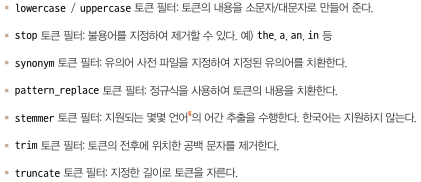
(3-4) 토큰 필터: 토큰 스트림을 받아 토큰을 추가, 변경, 삭제
- 애널라이저에 0개 이상 토큰 필터 지정 가능 ( 여러 지정시 순차적 적용 )
es 내장 토큰 필터
### 토큰 필터 테스트
curl -XGET "http://192.168.56.10:9200/_analyze?pretty" -H "Content-Type: application/json" -d \
'{
  "filter": ["lowercase"],
  "text": "Hello, World!"
}'
>>> 토큰 소문자로 변경
(3-5) 내장 애널라이저
- 애널라이저는 ( 캐릭터 필터 + 토크나이저 + 토큰 필터 ) 조합으로 구성
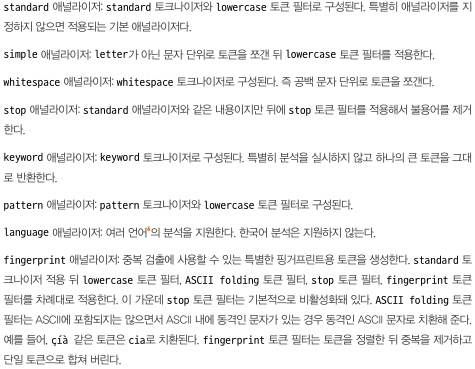
- es는 ( 캐릭터 필터 + 토크나이저 + 토큰 필터 ) 이러한 조합을 미리 만들어 놓은 내장 애널라이저 있음
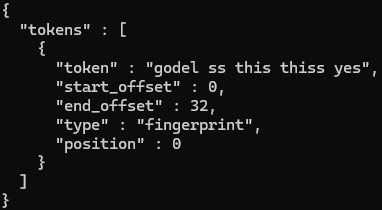
### fingerprint 애널라이저 테스트
curl -XGET "http://192.168.56.10:9200/_analyze?pretty" -H "Content-Type: application/json" -d \
'{
  "analyzer": "fingerprint",
  "text": "Yes yes, Godel ss ss this thiss."
}'
(3-6) 애널라이저 매핑에 적용
### 애널라이저 매핑에 적용 테스트
curl -XPUT "http://192.168.56.10:9200/analyzer_test" -H "Content-Type: application/json" -d \
'{
  "settings": {
    "analysis": {"analyzer": {"default": {"type": "keyword"}}}
  },
  "mappings": {
    "properties": {
      "defaultText": {"type": "text"},
      "standardText": {"type": "text", "analyzer": "standard"}
    }
  }
}'

>>> settings.analysis.analyzer.default : 해당 인덱스 디폴트 애널라이저 등록 가능 ( keyword )
>>> mappings 필드에 analyzer 옵션으로 각 필드 별로 애널라이저 지정 가능
( standardText 필드는 standard 애널라이저 지정 )
(3-7) 커스텀 애널라이저
- es 내장 에널라이저로 목표 달성 못할시 커스텀 애널라이저 사용 고려
### 커스텀 애널라이저 테스트
curl -XPUT "http://192.168.56.10:9200/analyzer_test2" -H "Content-Type: application/json" -d \
'{
  "settings": {
    "analysis": {
      "char_filter": {
        "my_char_filter": {
          "type": "mapping",
          "mappings": ["i. => 1.", "ii. => 2.", "iii. => 3.", "iv. => 4."]
        }
      },

      "analyzer": {
        "my_analyzer": {
          "char_filter": ["my_char_filter"],
          "tokenizer" : "whitespace",
          "filter": ["lowercase"]
        }
      }
    }
  },
  "mappings": {
    "properties": {
      "myText": {"type": "text", "analyzer": "my_analyzer"}
    }
  }
}'


### 생성된 커스텀 애널라이저 테스트
curl -XGET "http://192.168.56.10:9200/analyzer_test2/_analyze?pretty" -H "Content-Type: application/json" -d \
'{
  "analyzer": "my_analyzer",
  "text": "i.Hello ii.World iii.Bye iv.World!"
}'

>>> 총 4개의 토큰으로 역색인 확인
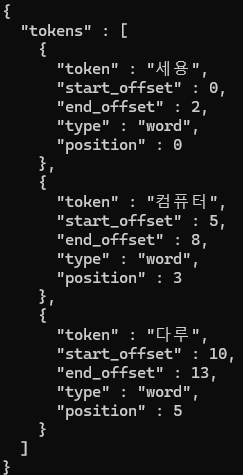
(3-8) 플러그인 설치를 통한 애널라이저 추가 및 한국어 형태소 분석
### 엘라스틱 서치 한국어 플러그인 설치 ( analysis-nori )
!! 플러그인 설치시 es 클러스터 구성하는 모든 노드에 설치 !!
/usr/share/elasticsearch/bin/elasticsearch-plugin install analysis-nori
>>> 각 노드 설치해 엘라스틱서치 재가동

### nori 애널라이저 테스트
curl -XGET "http://192.168.56.10:9200/_analyze?pretty" -H "Content-Type: application/json" -d \
'{
  "analyzer": "nori",
  "text": "세용이는 컴퓨터를 다룬다."
}'
(3-9) 노멀라이저 : 토그나이저 없이 ( 캐릭터 필터 + 토큰 필터 ) 구성
- 적용 대상이 keyword 타입의 필드
- 단일 토큰 생성
- es 제공 노멀라이저는 lowercase 밖에 없음 ( 다른 방법 사용시 커스텀 노멀라이저 조합 해야 됨 )
### 커스텀 노멀라이저 테스트
curl -XPUT "http://192.168.56.10:9200/normalizer_test" -H "Content-Type: application/json" -d \
'{
  "settings": {
    "analysis": {
      "normalizer": {
        "my_normalizer": {
          "type": "custom",
          "char_filter": [],
          "filter": ["asciifolding","uppercase"]
        }
      }
    }
  },

  "mappings": {
    "properties": {
      "myNormalizerKeyword": {"type": "keyword", "normalizer": "my_normalizer"},
      "lowercaseKeyword": {"type": "keyword", "normalizer": "lowercase"},
      "defaultKeyword": {"type": "keyword"}
    }
  }
}'
>>> myNormalizerKeyword 필드는 my_normalizer 노멀라이저
>>> lowercaseKeyword 필드는 lowercase 노멀라이저
>>> defaultKeyword 필드는 아무것도 지정 안됨 ( 애널라이저는 standard 애널라이저 적용하지만 노멀라이저는 X )


### 노멀라이저 동작 테스트
curl -XGET "http://192.168.56.10:9200/normalizer_test/_analyze?pretty" -H "Content-Type: application/json" -d \
'{
  "field": "myNormalizerKeyword",
  "text": "Happy sy0218"
}'

curl -XGET "http://192.168.56.10:9200/normalizer_test/_analyze?pretty" -H "Content-Type: application/json" -d \
'{
  "field": "lowercaseKeyword",
  "text": "Happy sy0218"
}'

curl -XGET "http://192.168.56.10:9200/normalizer_test/_analyze?pretty" -H "Content-Type: application/json" -d \
'{
  "field": "defaultKeyword",
  "text": "Happy sy0218"
}'
>>> myNormalizerKeyword 필드 : "HAPPY SY0218"
>>> lowercaseKeyword 필드 : "happy sy0218"
>>> defaultKeyword 필드 : "Happy sy0218"
4. 인덱스 템플릿
- 템플릿을 사전에 정의함 으로써 업무 효율성 향상 반복 작업을 줄일수 있음
(4-1) 인덱스 템플릿
### 인덱스 템플릿 테스트
!! index_patterns 필드에 인덱스 패턴을 지정 ( 와일드 카드 지정 가능 ) !!
!! priority 값을 이용해 인덱스 템플릿 간 우선 순위 지정 가능 !!
curl -XPUT "http://192.168.56.10:9200/_index_template/my_template" -H "Content-Type: application/json" -d \
'{
  "index_patterns": ["pattern_test_index-*", "another_pattern-*"],
  "priority": 1,
  "template": {
    "settings": {
      "number_of_shards": 2,
      "number_of_replicas": 2
    },
    "mappings": {
      "properties": {
        "myTextField": {"type": "text"}
      }
    }
  }
}'

### 인덱스 템플릿 조회
curl -XGET "http://192.168.56.10:9200/_index_template/my_template?pretty"


### 인덱스 템플릿을 사용하여 인덱스 생성
curl -XPUT "http://192.168.56.10:9200/pattern_test_index-1"
>>> 인덱스 조회 : curl -XGET "http://192.168.56.10:9200/pattern_test_index-1?pretty"


### 인덱스 템플릿 리스트 조회
curl -XGET "http://192.168.56.10:9200/_index_template?pretty" | jq '.index_templates[].name'
(4-2) 컴포넌트 템플릿
- 인덱스 템플릿 사용시 중복되는 부분 존재.. 이런 부분 재사용할 수 있는 작은 템플릿 블록으로 쪼갠것이 컴포넌트 템플릿
### 인덱스 컴포넌트 템플릿 테스트
1) mappings 필드 컴포넌트 템플릿
curl -XPUT "http://192.168.56.10:9200/_component_template/timestamp_mappings" -H "Content-Type: application/json" -d \
'{
  "template": {
    "mappings": {
      "properties": {
        "timestamp": {"type": "date"}
      }
    }
  }
}'

2) settings 필드 컴포넌트 템플릿
curl -XPUT "http://192.168.56.10:9200/_component_template/my_shard_settings" -H "Content-Type: application/json" -d \
'{
  "template": {
    "settings": {"number_of_shards": 2, "number_of_replicas": 2}
  }
}'
>>> timestamp_mappings 템플릿 에는 timestamp 필드 설정을 담음
>>> my_shard_settings 템플릿 에는 샤드와 관련된 설정을 담음

### 컴포넌트 템플릿 나열
curl -XGET "http://192.168.56.10:9200/_component_template?pretty" | jq '.component_templates[].name'


### 인덱스 템플릿 생성시 컴포넌트 템플릿 사용 테스트
!! composed_of 필드에 재사용할 컴포넌트 템플릿 블록을 넣음 !!
curl -XPUT "http://192.168.56.10:9200/_index_template/my_template2" -H "Content-Type: application/json" -d \
'{
  "index_patterns": ["timestamp_index-*"],
  "composed_of": ["timestamp_mappings", "my_shard_settings"]
}'


### 컴포넌트 템플릿을 사용한 인덱스 템플릿을 활용해 인덱스 생성
curl -XPUT "http://192.168.56.10:9200/timestamp_index-001"
>>> 설정 확인 : curl -XGET "http://192.168.56.10:9200/timestamp_index-001?pretty"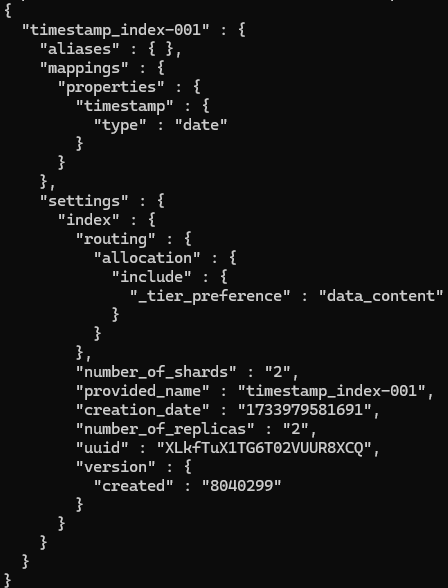
(4-3) 레거시 템플릿 : 이전 버전 인덱스 템플릿 ( 컴포넌트 템플릿을 조합하지 못하는 거 이외 동일 )
(4-4) 동적 템플릿
- 인덱스에 새로 들어온 필드 매핑을 사전에 정의한 대로 동적으로 생성하는 기능
### 동적 템플릿 테스트
!! mappings 안에 dynamic_templates 필드를 통해 지정 !!
curl -XPUT "http://192.168.56.10:9200/_index_template/dynamic_mapping_template" -H "Content-Type: application/json" -d \
'{
  "index_patterns": ["dynamic_mapping*"],
  "priority": 1,
  "template": {
    "settings": {"number_of_shards": 2, "number_of_replicas": 2},
    "mappings": {
      "dynamic_templates": [
        {
          "my_text": {
            "match_mapping_type": "string", "match": "*_text",
            "mapping": {"type": "text"}
          }
        },

        {
          "my_keyword": {
            "match_mapping_type": "string", "match": "*_keyword",
            "mapping": {"type": "keyword"}
          }
        }
      ]
    }
  }
}'
>>> 새로운 필드가 문자열일떄 _text로 끝나면 text타입, _keyword로 끝나면 keyword 타입 동적 지정


### 동적 템플릿 테스트
curl -XPUT "http://192.168.56.10:9200/dynamic_mapping-0218"
>>> 인덱스 조회 : curl -XGET "http://192.168.56.10:9200/dynamic_mapping-0218?pretty"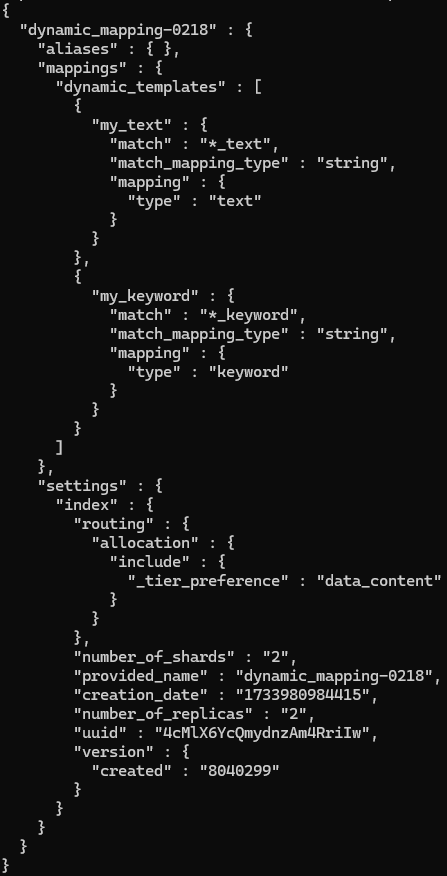
인덱스 필드 동적 템플릿 조건 지정 필드
- match_mapping_type : 들어오는 데이터 타입 확인 후 적용
- match / umatch : 필드이름 지정된 패턴 매칭 확인 / 지정된 패턴 미매칭 확인
- path_match / path_unmatch : match / umatch 동일 하지만 전체 경로 이용 (ex. my_object.name.text*)
(4-5) 빌트인 인덱스 템플릿
- 엘리스틱서치 미리 정의된 인덱스 템플릿 ( 내장 인덱스 템플릿 )
5. 라우팅 : 인덱스 구성 샤드 중 몇번 샤드 대상으로 작업 수행할지 지정하기 위한 값
- 색인 시 라우팅 지정했으면, ( 조회, 업데이트, 삭제, 검색 ) 작업에도 똑같이 라우팅 지정!!
### 라우팅 테스트
1) 샤드 5를 가진 인덱스 생성
curl -XPUT "http://192.168.56.10:9200/routing_test" -H "Content-Type: application/json" -d \
'{
  "settings": {"number_of_shards": 5, "number_of_replicas": 1}
}'

2) 라우팅 미 지정 색인, 라우팅 지정 색인
curl -XPUT "http://192.168.56.10:9200/routing_test/_doc/1" -H "Content-Type: application/json" -d \
'{
  "login_id": "sy0218",
  "comment": "오!! 오!! 오!!",
  "created_at": "2024-12-13"
}'

curl -XPUT "http://192.168.56.10:9200/routing_test/_doc/2?routing=msg1" -H "Content-Type: application/json" -d \
'{
  "login_id": "jiwow0725",
  "comment": "하!! 하!! 하!!",
  "created_at": "2024-12-13"
}'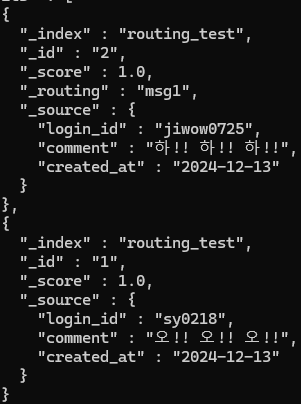
- 라우팅 미 지정시 _routing 필드가 없지만 지정하여 색인한 문서는 "_routing" : "msg1"
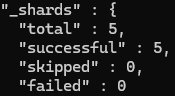
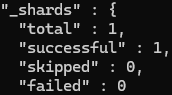
- es는 검색시 라우팅 기입 않하면 전체 샤드 대상 검색, 라우팅 값 명시 하면 단일 샤드 대상으로 검색
### 라우팅 지정, 미 지정 검색 테스트
1) 라우팅 미 지정 검색
curl -XGET "http://192.168.56.10:9200/routing_test/_search?pretty"

2) 라우팅 지정 검색
curl -XGET "http://192.168.56.10:9200/routing_test/_search?routing=msg1&pretty"
1) 라우팅 미지정 검색 ( 5개 샤드 검색 )
2) 라우팅 지정 검색 ( 단일 샤드 검색 )
(5-1) 인덱스 내 _id 고유성 보장
- 인덱스 내 _id 값의 고유성 검증은 샤드 단위로 보장
- 즉, 라우팅 값 다르게 지정하게 되면 한 인덱스 내에 같은 _id를 가진 문서가 여러개 생길수 있음...
- 이것은 사용자 책임 ㅠㅠ, 문서 색인시 항상 라우팅 값을 올바르게 지정해야됨
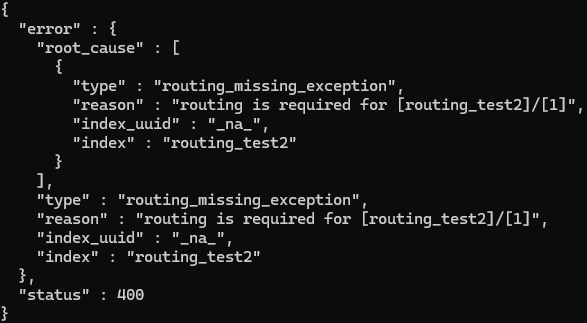
(5-2) 인덱스 매핑에서 라우팅 필수로 지정
### 인덱스 매핑시 라우팅 필수 지정 설정 테스트
curl -XPUT "http://192.168.56.10:9200/routing_test2" -H "Content-Type: application/json" -d \
'{
  "mappings": {
    "_routing": {
      "required": true
    }
  }
}'

>>> mappings 필드에 ( "required": true ) 라우팅 값 팔수 설정
>>> 해당 인덱스에 라우팅 값이 명시되지 않음 ( 색인, 조회, 업데이트, 삭제 ) 작업은 실패하게 됨

### 라우팅 테스트
curl -XPUT "http://192.168.56.10:9200/routing_test2/_doc/1?pretty" -H "Content-Type: application/json" -d \
'{
  "comment": "no no routing routing"
}'
'데이터 엔지니어( 실습 정리 ) > elasticsearch' 카테고리의 다른 글
| 4. 데이터 다루기 (3, 4, 5) (1) | 2024.12.19 |
|---|---|
| 4. 데이터 다루기 (1, 2) (0) | 2024.12.14 |
| 3. 엘라스틱서치 인덱스 설계 (1, 2) (0) | 2024.12.01 |
| 2. 엘라스틱서치 기본 동작과 구조 (0) | 2024.11.26 |
| 1. 엘라스틱서치 소개 및 설치 (0) | 2024.11.18 |


