
[ 엘라스틱 서치 바이블 ] 공부한 후 정리한 내용 입니다!!!
1. 인덱스 설정
- 엘라스틱서치는 인덱스 생성시 인덱스 동작 설정 지정 가능!!
### 엘라스틱서치 전체 인덱스 조회
curl -XGET "http://192.168.219.20:9200/_cat/indices?v"

### 인덱스 설정 조회
GET [인덱스명]/_settings
curl -XGET "http://192.168.219.20:9200/sy_index/_settings?pretty"
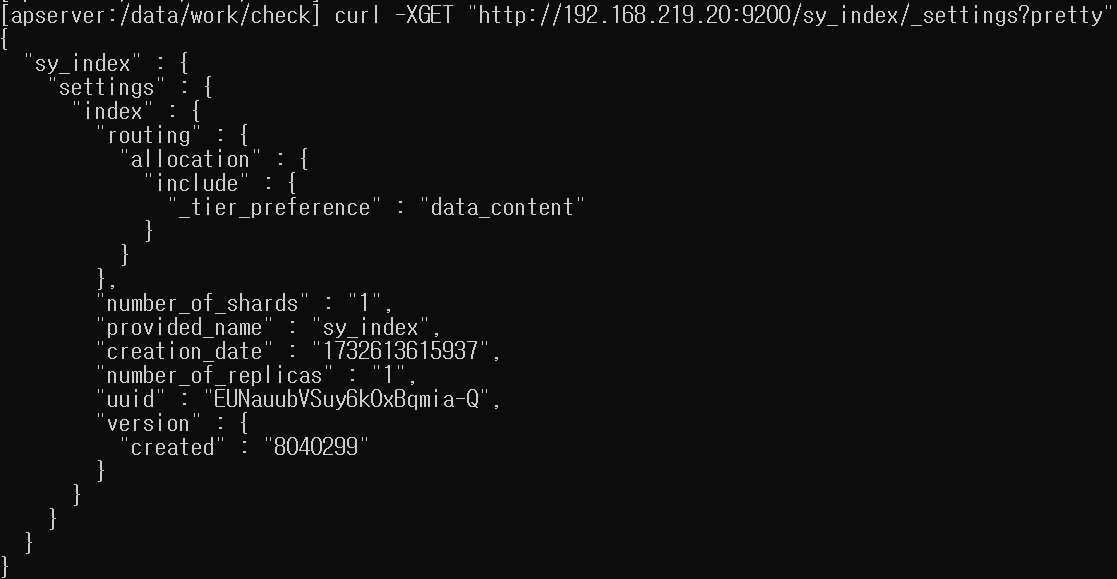
(1-1) number_of_shards
- 인덱스 데이터를 몇 개의 샤드로 쪼갤 것인지 지정
- 한번 지정시 reindex 를 통해 인덱스를 통쨰로 재색인 해야하기에 신중한 설계 필요!!!
- 샤드 숫자가 많아 지면 색인 성능 감소
- 샤드 숫자가 적으면 샤드 하나 크기가 커지므로 장애 상황에서 샤드 복구에 너무 많은 시간이 소요, 클러스터 안정성 떨어짐
(1-2) number_of_replicas
- 복제본 샤드를 몇개 둘것인지 설정
- 엘라스틱 클러스터 노드 갯수, 어느정도 고가용성 제공할지 고려해 지정
- 인덱스 생성 이후에도 동적으로 변경 가능!!
### 인덱스 설정 number_of_replicas 동적 변경 호출
curl -XPUT "http://192.168.219.20:9200/sy_index/_settings" -H "Content-Type: application/json" -d '
{
  "index.number_of_replicas": 0 ( 0 으로 설정시 복제본을 두지 않음 )
}'

** 복제본 샤드를 생성하지 않는 설정은 주로 대용량 초기 데이터를 마이그레이션 하는 등
쓰기 성능을 일시적 끌어올리기 위해 사용 **
(1-3) refresh_interval
- 해당 인덱스 refresh를 얼마나 자주 수행할 것인지 설정
- 색인된 문서는 es refresh 되야 검색 가능
### 엘라스틱서치 refresh_interval 설정
curl -XPUT "http://192.168.219.20:9200/_settings" -H "Content-Type: application/json" -d '
{
  "index.refresh_interval": "1s" ( 1초에 한번 es refresh 수행 )
}'
** -1로 설정시 주기적 refresh 수행하지 않음!!


### 명시적 지정 refresh_interval 되돌리기
curl -XPUT "http://192.168.219.20:9200/_settings" -H "Content-Type: application/json" -d '
{
  "index.refresh_interval": null
}
'


### 엘라스틱서치 refresh_interval 조회
curl -XGET "http://192.168.219.20:9200/sy_index/_settings/index.refresh_interval?pretty"
- es refresh 1초 설정시 마지막 검색 쿼리 기준으로 수행
- 즉, 30초 이상 검색 쿼리가 들어오지 않으면 다음 첫 검색 쿼리 들어올떄 까지 es refresh 안함!!
- 해당 설정은 index.search.idle.after 설정에서 변경
(1-4) 인덱스 설정을 지정해 인덱스 생성
### 엘라스틱서치 인덱스 설정 지정해 인덱스 생성
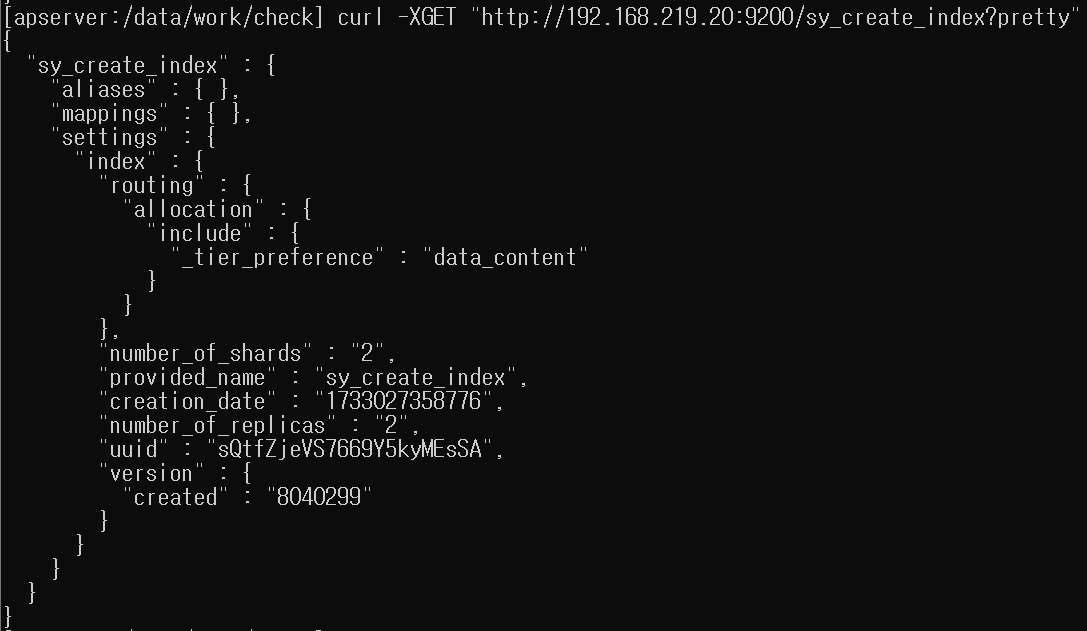
curl -X PUT "http://192.168.219.20:9200/sy_create_index" -H "Content-Type: application/json" -d '
{
  "settings": {
    "number_of_shards": 2,
    "number_of_replicas": 2
  }
}'
생성된 인덱스 설정 조회 ( curl -XGET "http://192.168.219.20:9200/sy_create_index/_settings?pretty" )
2. 매핑과 필드 타임
- 매핑 : 문서가 인덱스에 어떻게 색인되고 저장돠는지 정의하는 부분
- 엘라스틱서치는 문서 색인시 기존 매핑 정보를 가지고 있지 않던 새로운 필드가 들어오면 자동으로 적당한 필드 타입 지정해 매핑 정보 생성
### sy_create_index 문서 색인
curl -XPUT "http://192.168.56.10:9200/sy_create_index/_doc/1" \
-H 'Content-Type: application/json' \
-d '{
"title": "sy world",
"views": 218,
"public": true,
"point": 4.5,
"created": "'"$(date +"%Y-%m-%dT%H:%M:%SZ")"'"
}'


### mappings 필드 확인하는 명령어
curl -XGET "http://192.168.56.10:9200/sy_create_index?pretty"
매핑 필드

(2-1) 동적 매핑 vs 명시적 매핑
- 동적 매핑 : 엘라스틱서치가 자동으로 생성하는 매핑
- 명시적 매핑 : 사용자가 직접 매핑 지정
### es 명시적 매핑 ( 인덱스 생성시 매핑 지정 )
curl -XPUT "http://192.168.56.10:9200/new_sy_idx" -H "Content-Type: application/json" \
-d \
'{
  "mappings": {
    "properties": {
      "createdDate":{
        "type": "date",
        "format": "strict_date_time || epoch_millis"
      },
      "keywordString": {
        "type": "keyword"
      },
      "textString": {
        "type": "text"
      }
    }
  },
  "settings": {
    "index.number_of_shards": 1,
    "index.number_of_replicas": 1
  }
}'
# 각 필드에 데이터를 어떻나 형태로 저장할 것인지 지정


### es 매핑 정보 확인
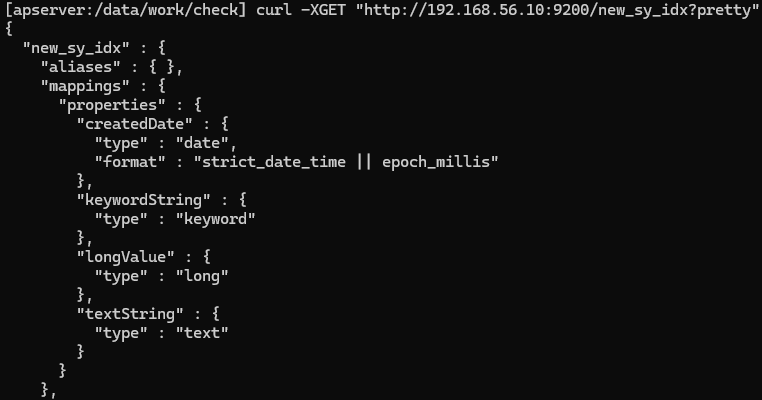
curl -XGET "http://192.168.56.10:9200/new_sy_idx?pretty"


### 인덱스 생성후 매핑 정보 추가
curl -XPUT "http://192.168.56.10:9200/new_sy_idx/_mapping" -H 'Content-Type: application/json' \
-d \
'{
  "properties": {
    "longValue": {
      "type": "long"
    }
  }
}'
추가된 매핑 정보 확인
(2-2) 필드 타입
엘라스틱서치 매핑 필드 타입은 한 번 지정시 변경이 불가 ( 신중한 지정 필요 )
(1) 심플 타입 : 직관적으로 알기 쉬운 자료형
- boolean : 참 과 거짓
- long, double : 숫자
- text, keyword : 문자열
- date : 날짜
- ip : ip 정보
- 등등...
- 숫자 타입
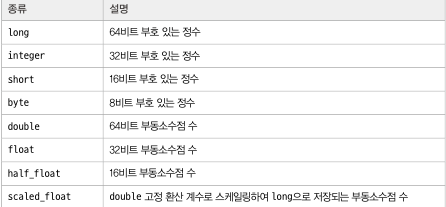
- 적은 비트 자료형을 고르면 색인 및 검색시 이득!! 다만 저장시는 실제 값에 마춰 최적화 되기에 디스크 사용량에는 이득이 없음!!
- 부동 소수점 필드시 환산 계수로 저장하는 scaled_float 타입 고려 가능 ( 부동 소수점 보다 정수의 형태로 저장하는 것이 디스크 공간 이득 볼 수 있음, 그러나 스케일 백터가 작을수록 정확도 에서 손해를 봄 )
- date 타입
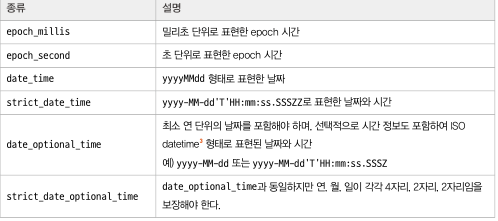
- date 타입은 들어오는 데이터의 형식을 "format" 이라는 옵션으로 지정
- 배열
- es는 배열을 표현하는 별도 타입 구분 없음!!
- BUT.. 여러 타입이 혼합된 배열 데이터의 색인 요청은 실패..
- es는 색인 과정에서 데이터가 단일, 배열 데이터인지 상관 없이 각 값마다 하나의 독립적인 역색인 구성
### array 배열 테스트
curl -XPUT "http://192.168.56.10:9200/array_test" -H 'Content-Type: application/json' \
-d \
'{"mappings": {"properties": {"logField": {"type": "long"}, "keywordField": {"type": "keyword"}}}}'


### 배열 삽입 test
curl -XPUT "http://192.168.56.10:9200/array_test/_doc/1" -H "Content-Type: application/json" \
-d \
'{"logField": 309, "keywordField": ["hello","world"]}'

curl -XPUT "http://192.168.56.10:9200/array_test/_doc/2" -H "Content-Type: application/json" \
-d \
'{"logField": [221, 309, 441144], "keywordField": "hellow"}'

### es term 쿼리 ( 문서 내 지정 필드 값이 일치하는 문서 검색 )
curl -XGET "http://192.168.56.10:9200/array_test/_search?pretty" -H 'Content-Type: application/json' \
-d \
'{"query": {"term": {"logField": 309}}}'
(2) 계층 구조를 지원하는 타입 : 필드에 필드가 들어가는 계층 구조의 데이터를 담는 타입
- object 타입과 nested 타입이 있는데 두 타입은 동작이 다름
- 명시적 표현을 하지 않을시 object 타입이 default
- object 타입
### object 문서 색인
curl -XPUT "http://192.168.56.10:9200/object_test/_doc/1" -H "Content-Type: application/json" -d '{"spec":[{"cores":12,"memory":128,"storage":8000},{"cores":6,"memory":64,"storage":8000},{"cores":6,"memory":32,"storage":4000}]}'


### object 문서 검색 ( bool 쿼리 must 절에 여러 조건 넣으면 AND 조건으로 연결 )
curl -XGET "http://192.168.56.10:9200/object_test/_search?pretty" -H "Content-Type: application/json" -d \
'{"query": {"bool": {"must": [{"term": {"spec.cores": "6"}}, {"term": {"spec.memory": "128"}}]}}}'

>>> ( spec.cores == 6 ) and ( spec.memory == 128 ) 조건 조회
object 문서 검색 결과
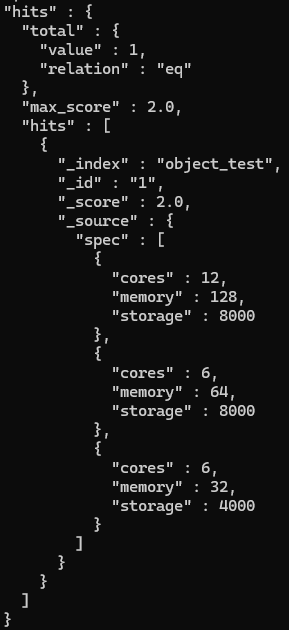
spec.cores가 6이고 spec.memory가 128인 spce 객체는 존재 않지만 검색 결과 포함됨..

object 타입 데이터는 다음과 같이 평탄화
{
  "spec.cores" : [12, 6, 6],
  "spec.memory" : [128, 64, 32],
  "spec.storage" : [8000, 8000, 4000]
}

>>> 즉, spec.cores 역색인에서 6을 찾을수 있고, spec.memory 역색인 에서 128을 찾을수 있어 문서 검색 가능
>>> object 타입은 배열을 구성하는 객체 데이터를 서로 독립적인 데이터로 취급하지 않음!!
- nested 타입
- object 타입과 달리 배열 내 각 객체를 독립적으로 취급
- type에 "nested" 명시 해야됨 ( default 가 object 타입 이기에 )
### nested_test 인덱스 생성 ( 명시적 매핑 type: nested )
curl -XPUT "http://192.168.56.10:9200/nested_test" -H "Content-Type: application/json" -d \
'{"mappings": {"properties": {"spec": {"type": "nested", "properties": {"cores": {"type": "long"}, "memory": {"type": "long"}, "storage": {"type": "long"}}}}}}'


### nested_test 인덱스 문서 색인
curl -XPUT "http://192.168.56.10:9200/nested_test/_doc/1" -H "Content-Type: application/json" -d '{"spec":[{"cores":12,"memory":128,"storage":8000},{"cores":6,"memory":64,"storage":8000},{"cores":6,"memory":32,"storage":4000}]}'


### nested_test 문서 검색
curl -XGET "http://192.168.56.10:9200/nested_test/_search?pretty" -H "Content-Type: application/json" -d \
'{"query": {"bool": {"must": [{"term": {"spec.cores": "6"}}, {"term": {"spec.memory": "128"}}]}}}'

>>> ( spec.cores == 6 ) and ( spec.memory == 128 ) 조건 조회
>>> 실제 조회시 아무것도 검색되지 않음
>>> but.. spec.memory 조건 64로 변경후 검색해도 아무것도 검색되지 않음.. why???- nested 타입은 객체 배열의 각 객체를 내부적으로 별도의 루씬 문서로 분리해 저장
- 즉, nested 쿼리 라는 전용 쿼리를 이용해 검색
nested 쿼리
### nested 쿼리 검색
### nested 쿼리 지정후 path에 검색 대상 넣어주면 됨
curl -XGET "http://192.168.56.10:9200/nested_test/_search?pretty" -H "Content-Type: application/json" -d \
'{
  "query": {
    "nested": {
      "path": "spec",
      "query": {
        "bool": {
          "must": [
            {
              "term": {
                "spec.cores": "6"
              }
            },
            {
              "term": {
                "spec.memory": "64"
              }
            }
          ]
        }
      }
    }
  }
}'- nested 타입은 내부적 각 객체를 별도 문서로 분리해 저장하기에 성능 문제 있음
- index.mapping.nested_fields.limit : 한 인덱스에 nested 타입을 몇개 까지 지정 제한 ( default : 50 )
- index.mapping.nested_objects.limit : 한 문서가 nested 객체를 몇개 까지 가질지 제한 ( default : 10000 )
- 해당 값을 높이면 Out Of Memory 위험
object 타입 vs nested 타입

(3) 이외 타입
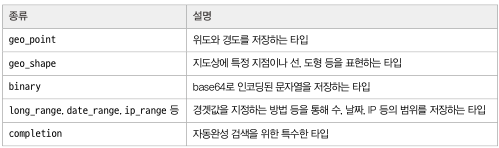
(4) text 타입, keyword 타입 : 문자열 자료형 담은 타입
- text 타입 >>> 애널라이저 적용후 색인
- keyword >>> 노멀라이저 적용후 색인
### new_sy_idx 문서 색인
curl -XPUT "http://192.168.56.10:9200/new_sy_idx/_doc/1" -H "Content-Type: application/json" -d \
'{
  "keywordString": "Hello, World!",
  "textString": "Hello, World!"
}'

### new_sy_idx 인덱스 문서 검색 ( textString 필드 필터 )
curl -XGET "http://192.168.56.10:9200/new_sy_idx/_search?pretty" -H "Content-Type: application/json" -d \
'{
  "query": {"match": {"textString": "hello"}}
}'
>>> 색인한 문서 검색 가능


### new_sy_idx 인덱스 문서 검색 ( keywordString 필드 필터 )
curl -XGET "http://192.168.56.10:9200/new_sy_idx/_search?pretty" -H "Content-Type: application/json" -d \
'{
  "query": {"match": {"keywordString": "hello"}}
}'
>>> 색인한 문서 검색 불가


### text 타입 검색
### match 쿼리는 검색 대상 필드가 text 타입일떄 검색 질의어도 애널라이저로 분석
### SYOUNG WORLD OF ES HELLO 라는 문자열 검색시 >>> syoung, world, of, es, hello 텀으로 쪼갬
curl -XGET "http://192.168.56.10:9200/new_sy_idx/_search?pretty" -H "Content-Type: application/json" -d \
'{
  "query": {"match": {"textString": "SYOUNG WORLD OF ES HELLO"}}
}'
>>> text 타입 필드가 hello 텀과 world 텀으로 역색인 생성 했으므로 검색 가능
text 타입, keyword 타입 색인 동작 과정

1) text 타입
- 문자열을 애널라이저를 통해 여러 토큰으로 쪼갬
- 각 토큰으로 텀을 만들어 역색인 구성 ( Hello, World! >>> hello 문자열 텀과, world 문자열 텀으로 쪼개짐 )
- 두 문자로 역색인을 구성하기에 hello 라는 검색어로 문서 검색 가능
2) keyword 타입
- 문자열을 애널라이저를 통해 쪼개지 않음
- 노멀라이저를 통해 전처리 작업 이후 단일 토큰 생성
- 전체 문자열 역색인 구성 ( Hello, World! >>> Hello, World! )
- 즉, hello 라는 검색어로 문서 검색 불가, Hello, World! 정확히 입력해야됨
검색시
- text 타입은 fielddata 라는 캐시를 사용
- keyword 타입은 doc_values 라는 캐시를 사용
요약
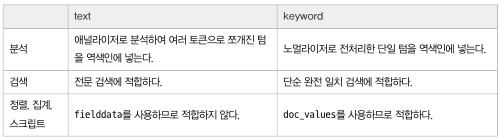
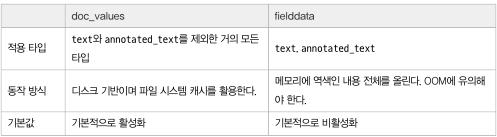
(2-3) doc_values : 디스크 기반 자료구조 ( 파일 시스템 캐시로 효율적인 정렬, 집계, 스크립트 작업 수행 )
- 엘라스틱서치 검색 : 텀 > 역색인 > 문서 ( 텀을 보고 역색인 에서 문서를 찾는 방식 )
- 엘라스틱서치 정렬, 집계 스크립트 작업 : 문서 > 필드내 텀 ( 문서를 보고 필드내 텀을 찾음 )
- text, annotated_text 타입은 지원 X
- 정렬, 집계, 스크립트 작업 필요없는 필드는 doc_values 끌수 있음 ( "doc_values": false, 디폴트는 True )
(2-4) fielddata
- text 필드는 정렬, 집계, 스크립트 작업시 fielddata 라는 캐시 이용
- fielddata는 정렬, 집계 작업시 역색인 전체를 읽어 힙 메모리에 올림
- OOM 문제를 발생 시킬수 있기에 fielddata 기본값은 false ( 활성화 시 fielddata: true )
요약
(2-5) _source
- 엘라스틱서치 원본 json 문서를 저장하는 메타테이터 필드
- _source 필드는 역색인을 생성하지 않기에 검색 대상 안됨
_source 비활성화
- _source 필드는 json 문서 통쨰로 담기에 디스크 많이 사용..
### _source 필드 데이터 저장하지 않도록 설정 ( 인덱스 생성시 mappings 필드에서 설정 해야됨 )
curl -XPUT "http://192.168.56.10:9200/no_source_test" -H "Content-Type: application/json" -d \
'{
  "mappings": {"_source": {"enabled": false}}
}'

### _source 필드 데이터 저장 비활성화 인덱스에 문서 색인
curl -XPUT "http://192.168.56.10:9200/no_source_test/_doc/1" -H "Content-Type: application/json" -d \
'{
  "title": "sy0218",
  "created": "2024-12-05"
'}

### 문서 확인
curl -XGET "http://192.168.56.10:9200/no_source_test/_doc/1?pretty"
_source 필드 비활성화 문서 확인 ( _source 필드가 조회되지 않는것을 확인 )

(1) _source 비활성화 단점
- update 쿼리 사용 불가
- reindex 사용 불가
인덱스 코덱 변경
- 성능 희생하더라도 디스크 공간 절약이 필요할시 _source 비활성화 보단 인덱스 데이터 압축률을 높이는 방법
### 인덱스 생성시 인덱스 데이터 압축률 높이는 방법 ( settings 필드에 지정 )
curl -XPUT "http://192.168.56.10:9200/codec_test" -H "Content-Type: application/json" -d \
'{
  "settings": {"index": {"codec": "best_compression"}}
}'

>>> 해당 설정은 동적 변경 불가능!!
synthetic source : _source 필드에 json 원문 저장 안함
- _source 비활성화와 차이점은 _source 필드를 읽어야 하면 각 필드의 doc_values를 모아 _source 재조립해 동작
- 인덱스 모든 필드 doc_values를 사용하는 필드여야함
- 성능은 떨어지지만 인덱스 크기를 매우 줄여줌, _source 비활성화와 다르게 reindex 수행 가능
(2-6) index : 해당 필드 역색인 만들 것인지 지정 ( default : true )
- false 설정시 역색인이 없기에 해당 필드는 검색 대상이 되지 않지만 다른 필드를 대상 으로 한 검색 결과에 포함 ( 문서 내용은 _source 라는 메타 필드에 저장되기 떄문 )
- 역색인을 생성하지 않을 뿐 doc_values를 사용하는 필드면 정렬, 집계 대상 으로 사용 가능
- es 8.1 이상 부터 index 속성이 false 라도 doc_values를 사용하는 필드 일경우 검색이 가능 ( but.. 성능은 많이 떨어짐 그래도 그 만큼 디스크 공간 절약 가능 )
### index가 false인 필드 생성
curl -XPUT "http://192.168.56.10:9200/mapping_test" -H "Content-Type: application/json" -d \
'{
  "mappings": {
    "properties": {
      "notsearchtext": {
        "type": "text",
        "index": false
      },
      "docvaluessearchtext": {
        "type": "keyword",
        "index": false
      }
    }
  }
}'


### mapping_test 인덱스에 문서 색인
curl -XPUT "http://192.168.56.10:9200/mapping_test/_doc/1" -H "Content-Type: application/json" -d \
'{
  "textString" : "Hello, World!",
  "notsearchtext": "World, Hello!",
  "docvaluessearchtext": "hello"
}'


### mapping_test 인덱스 검색
### type: text, index: false인 필드 검색
curl -XGET "http://192.168.56.10:9200/mapping_test/_search?pretty" -H "Content-Type: application/json" -d \
'{
  "query": {"match": {"notsearchtext": "hello"}}
}'
>>> 검색 자체가 불가능하다는 에러 발생

### type: keyword, index: false인 필드 검색
curl -XGET "http://192.168.56.10:9200/mapping_test/_search?pretty" -H "Content-Type: application/json" -d \
'{
  "query": {"match": {"docvaluessearchtext": "hello"}}
}'
>>> 검색 가능- 필드가 keyword 타입은 doc_values를 사용하기에 역색인이 없더라고 doc_values 검색을 수행가능!!
(2-7) enabled : 엘라스틱서치가 파싱조차 수행 안함
- object 타입 필드에만 적용
- 데이터는 _source에 저장되만 역색인을 수행하지 않기에 검색 불가, 정렬 집계 대상도 될수 없음
- 파싱을 수행하지 않기에 타입 충돌이 발생하지 않음.. ( 타입 혼용 배열도 저장 가능 )
### enabled false 테스트를 위한 필드 추가
curl -XPUT "http://192.168.56.10:9200/mapping_test/_mapping" -H "Content-Type: application/json" -d \
'{
  "properties": {"notEnabled": {"type": "object", "enabled": false}}
}'


### notEnabled ( 타입이 object, enabled가 false ) 필드 문서 색인
curl -XPUT "http://192.168.56.10:9200/mapping_test/_doc/2" -H "Content-Type: application/json" -d \
'{
  "notEnabled": {"mixedTypeArray": ["hello", 4, false, {"sysy": "bar"}, null, [2,"e"]]}
}'

curl -XPUT "http://192.168.56.10:9200/mapping_test/_doc/3" -H "Content-Type: application/json" -d \
'{
  "notEnabled": "world"
}'- enabled를 false 지정시 역색인, doc_values를 생성하지 않고 파싱도 하지않기에 성능상 이득을 볼수 있음
- 즉, 테이터를 _source에서 확인만 하고 어떤 활용도 필요하지 않은 필드면 enabled를 false로 지정하는 것을 고려
'데이터 엔지니어( 실습 정리 ) > elasticsearch' 카테고리의 다른 글
| 4. 데이터 다루기 (3, 4, 5) (1) | 2024.12.19 |
|---|---|
| 4. 데이터 다루기 (1, 2) (0) | 2024.12.14 |
| 3. 엘라스틱서치 인덱스 설계 (3, 4, 5) (0) | 2024.12.10 |
| 2. 엘라스틱서치 기본 동작과 구조 (0) | 2024.11.26 |
| 1. 엘라스틱서치 소개 및 설치 (0) | 2024.11.18 |


