데이터 엔지니어( 실습 정리 )/airflow
(14) - 프로젝트 ( 뉴욕에서 가장 빠른 길 찾기 )
세용용용용
2024. 9. 23. 13:48
Apache Airflow 기반의 데이터 파이프라인 공부한 후 정리한 내용 입니다!!!
목표 : A >>> B 로 가려면 어떤 교통 수단이 가장 빠른지 묻는 프로젝트 구성
- 데이터 추출, 로드
- 형식 변환 ( 전처리 )
- 데이터를 통한 결론 도출

깃허브 clone
https://github.com/K9Ns/data-pipelines-with-apache-airflow.git
GitHub - K9Ns/data-pipelines-with-apache-airflow
Contribute to K9Ns/data-pipelines-with-apache-airflow development by creating an account on GitHub.
github.com
1. 도커 컴포트 실행
docker-compose up -d --build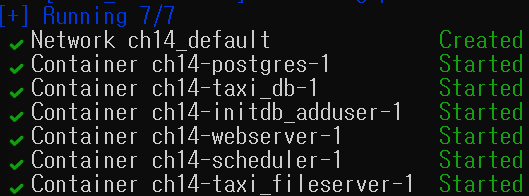
(1-1) texi && bike 데이터 요청
# texi
curl http://localhost:8081/09-23-2024-11-45-00.csv
# bike
curl --user citibike:cycling http://localhost:8082/recent/hour/1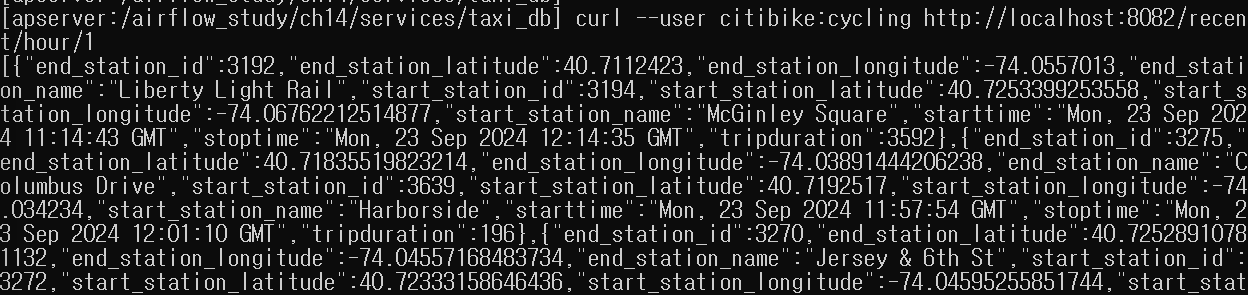
2. 데이터 추출
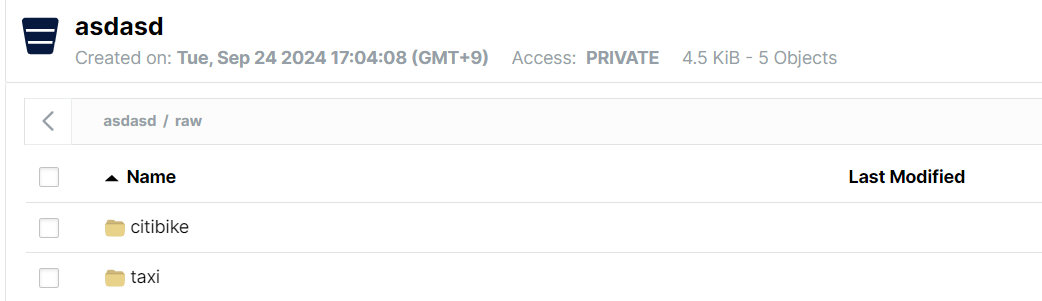
- 데이터를 추출해 MinIO 스토리지 저장
dag=DAG(
    dag_id="nyc_dag",
    schedule_interval=None,
    start_date=airflow.utils.dates.days_ago(1),
    catchup=False,
)

# ts_nodash는 airflow에서 실행시간을 제공하는 템플릿 변수
def _download_citi_bike_data(ts_nodash, **_):
    citibike_conn = BaseHook.get_connection(conn_id="citibike") # 설정한 conn_id 지정

    url = f"http://{citibike_conn.host}:{citibike_conn.port}/recent/minute/15"
    response = requests.get(
        url, auth=HTTPBasicAuth(citibike_conn.login, citibike_conn.password)
    )
    data=response.json()

    # MinIO에 적재
    s3_hook = S3Hook(aws_conn_id="s3")
    s3_hook.load_string(
        string_data=json.dumps(data),
        key=f"raw/citibike/{ts_nodash}.json",
        bucket_name="asdasd"
    )

# citi bike >> s3 적재 파이썬 오퍼레이터
download_citi_bike_data=PythonOperator(
    task_id="download_citi_bike_data",
    python_callable=_download_citi_bike_data,
    dag=dag,
)

def _download_taxi_data():
    taxi_conn=BaseHook.get_connection(conn_id="taxi") # 설정한 conn_id 지정
    s3_hook=S3Hook(aws_conn_id="s3")

    url=f"http://{taxi_conn.host}"
    response=requests.get(url) # 파일 리스트 가져옴
    files=response.json()

    exported_files = []
    for filename in [f["name"] for f in files]:
        response=requests.get(f"{url}/{filename}")
        s3_key = f"raw/taxi/{filename}"
        try:
            s3_hook.load_string(
                string_data=response.text,
                key=f"raw/taxi/{filename}",
                bucket_name="asdasd"
            )
            print(f"Uploaded raw/taxi/{filename} to MinIO.")
            exported_files.append(s3_key)
        except ValueError:
            print(f"File raw/taxi/{filename} already exists.")
    return exported_files

# taxi >> s3 적재 파이썬 오퍼레이터
download_taxi_data=PythonOperator(
    task_id="download_taxi_data",
    python_callable=_download_taxi_data,
    dag=dag,
)
(2-1) MinIO 저장소 데이터 확인
3. 데이터 변환 적용
- 빅데이터 환경에서 대규모 데이터 전처리를 위해 Spark 적용 가능
- Spark는 인 메모리 기반 분산처리 오픈소스로 유명
- Spark는 SparkSubmitOperator, SSHOperator로 트리거 가능
- airflow는 Spark 태스크 트리거 및 모니터링만 담당
해당 실습에서는 전처리를 위해 PythonOperator, Pandas 사용
## 입력 ##
/raw/citibike/{ts_nodash}.json
/raw/taxi/*.csv

## 출력 ##
/processed/citibike/{ts_nodash}.parquet
/processed/taxi/{ts_nodash}.parquet
(3-1) 데이터 전처리 오퍼레이터
# MINIO 에서 데이터 가져오는 함수
def get_minio_object(pandas_read_callable, bucket, paths, pandas_read_callable_kwargs=None):
    s3_conn = BaseHook.get_connection(conn_id="s3") # MINIO 연결 커넥션
    minio_client = Minio(
        s3_conn.extra_dejson["host"].split("://")[1],
        access_key=s3_conn.extra_dejson["aws_access_key_id"],
        secret_key=s3_conn.extra_dejson["aws_secret_access_key"],
        secure=False,
    )

    # paths 변수가 문자열인지 확인후 리스트로 변환하는 코드
    if isinstance(paths, str):
        if paths.startswith("[") and paths.endswith("]"):
            paths = eval(paths)
        else:
            paths = [paths]

    if pandas_read_callable_kwargs is None:
        pandas_read_callable_kwargs = {}

    # MINIO 읽어 dataframe 변환후 dataframe로 결합후 최종 결과 return
    dfs = []
    for path in paths:
        minio_object = minio_client.get_object(bucket_name=bucket, object_name=path)
        df = pandas_read_callable(minio_object, **pandas_read_callable_kwargs)
        dfs.append(df)
    return pd.concat(dfs)

# MINIO에 전처리 완료된 데이터 저장하는 함수
def write_minio_object(
    df, pandas_write_callable, bucket, path, pandas_write_callable_kwargs=None
):
    s3_conn = BaseHook.get_connection(conn_id="s3")
    minio_client = Minio(
        s3_conn.extra_dejson["host"].split("://")[1],
        access_key=s3_conn.extra_dejson["aws_access_key_id"],
        secret_key=s3_conn.extra_dejson["aws_secret_access_key"],
        secure=False,
    )
    bytes_buffer = io.BytesIO()
    pandas_write_method = getattr(df, pandas_write_callable.__name__)
    pandas_write_method(bytes_buffer, **pandas_write_callable_kwargs)
    nbytes = bytes_buffer.tell()
    bytes_buffer.seek(0)
    minio_client.put_object(
        bucket_name=bucket, object_name=path, length=nbytes, data=bytes_buffer
    )

# 데이터 프레임으로 변환된 citi_bike 전처리 함수
def transform_citi_bike_data(df):
    taxi_zones = geopandas.read_file(
        "https://d37ci6vzurychx.cloudfront.net/misc/taxi_zones.zip"
    ).to_crs("EPSG:4326")
    start_gdf = geopandas.GeoDataFrame(
        df,
        crs="EPSG:4326",
        geometry=geopandas.points_from_xy(
            df["start_station_longitude"], df["start_station_latitude"]
        ),
    )
    end_gdf = geopandas.GeoDataFrame(
        df,
        crs="EPSG:4326",
        geometry=geopandas.points_from_xy(
            df["end_station_longitude"], df["end_station_latitude"]
        ),
    )
    df_with_zones = geopandas.sjoin(
        start_gdf, taxi_zones, how="left", op="within"
    ).rename(columns={"LocationID": "start_location_id"})
    end_zones = geopandas.sjoin(end_gdf, taxi_zones, how="left", op="within")
    df_with_zones["end_location_id"] = end_zones["LocationID"]
    return df_with_zones[
        [
            "tripduration",
            "starttime",
            "start_location_id",
            "stoptime",
            "end_location_id",
        ]
    ]

# citi_bike 전처리 오퍼레이터
process_citi_bike_data = PandasOperator(
    task_id="process_citi_bike_data",
    input_callable=get_minio_object,
    input_callable_kwargs={
        "pandas_read_callable": pd.read_json,
        "bucket": "asdasd",
        "paths": "raw/citibike/{{ ts_nodash }}.json",
    },
    transform_callable=transform_citi_bike_data,
    output_callable=write_minio_object,
    output_callable_kwargs={
        "bucket": "asdasd",
        "path": "processed/citibike/{{ ts_nodash }}.parquet",
        "pandas_write_callable": pd.DataFrame.to_parquet,
        "pandas_write_callable_kwargs": {"engine": "auto"},
    },
    dag=dag,
)

# taxi 데이터 전처리 함수
def transform_taxi_data(df):
    df[["pickup_datetime", "dropoff_datetime"]] = df[
        ["pickup_datetime", "dropoff_datetime"]
    ].apply(pd.to_datetime)
    df["tripduration"] = (
        (df["dropoff_datetime"] - df["pickup_datetime"]).dt.total_seconds().astype(int)
    )
    df = df.rename(
        columns={
            "pickup_datetime": "starttime",
            "pickup_locationid": "start_location_id",
            "dropoff_datetime": "stoptime",
            "dropoff_locationid": "end_location_id",
        }
    ).drop(columns=["trip_distance"])
    return df

# taxi 데이터 전처리 오퍼레이터
process_taxi_data = PandasOperator(
    task_id="process_taxi_data",
    input_callable=get_minio_object,
    input_callable_kwargs={
        "pandas_read_callable": pd.read_csv,
        "bucket": "asdasd",
        "paths": "{{ ti.xcom_pull(task_ids='download_taxi_data') }}",
    },
    transform_callable=transform_taxi_data,
    output_callable=write_minio_object,
    output_callable_kwargs={
        "bucket": "asdasd",
        "path": "processed/taxi/{{ ts_nodash }}.parquet",
        "pandas_write_callable": pd.DataFrame.to_parquet,
        "pandas_write_callable_kwargs": {"engine": "auto"},
    },
    dag=dag,
)
(3-2) 전처리 데이터 확인

4. 데이터 파이프 라인 구조화
- 재현 가능한 데이터 파이프라인이 핵심!! ( 파이프라인 설계시 중간 산출문 데이터를 저장하는 구조 )
- 원본, 전처리 데이터 외부 저장소에 저장하는 방법
5. 재현 가능한 데이터 파이프라인 개발
- 원시, 전처리 과정의 데이터를 저장했기에 최종 결과는 데이터 마트인 Postgres에 기록시 멱등성 도입
- 이번 실습에선 airflow 실행 시간을 컬럼으로 추가하여 멱등성 보장
(5-1) airflow 실행 시간 데이터 추가를 위한 테이블 생성 ( 멱등성 보장 )
CREATE TABLE taxi_rides(
    tripduration INTEGER,
    starttime TIMESTAMP,
    start_location_id INTEGER,
    stoptime TIMESTAMP,
    end_location_id INTEGER,
    airflow_execution_date TIMESTAMP # airflow 실행시간을 위한 컬럼
);

CREATE TABLE citi_bike_rides(
    tripduration INTEGER,
    starttime TIMESTAMP,
    start_location_id INTEGER,
    stoptime TIMESTAMP,
    end_location_id INTEGER,
    airflow_execution_date TIMESTAMP # airflow 실행시간을 위한 컬럼
);
(5-2) 데이터 삽입시 실행날짜 기준 데이터 삭제 ( 멱등성 보장 )
with engine.begin() as conn:
	conn.execute(
        # 실행 날짜와 동일한 데이터 삭제
		f"DELETE FROM {self._postgres_table} "
		f"WHERE airflow_execution_date='{context['execution_date']}';"
	)
	df.to_sql(self._postgres_table, con=conn, index=False, if_exists="append")