kafka 간단 실습
1. kafka 설치
sy0218/kafka_3.6.2_auto_ansible: kafka 자동 설치 및 동적 setup anible 파일 입니다!!! (github.com)
GitHub - sy0218/kafka_3.6.2_auto_ansible: kafka 자동 설치 및 동적 setup anible 파일 입니다!!!
kafka 자동 설치 및 동적 setup anible 파일 입니다!!! Contribute to sy0218/kafka_3.6.2_auto_ansible development by creating an account on GitHub.
github.com
>>> 편리한 설치를 위한 git hub에 ansible을 사용한 3.6.2 버전 설치 및 설정 자동 스크립트 배포해 놓았습니다
# git clone
git clone https://github.com/sy0218/kafka_3.6.2_auto_ansible.git

# 실행
ansible-playbook -i /data/work/kafka_3.6.2_auto_ansible/hosts.ini /data/work/kafka_3.6.2_auto_ansible/kafka_deploy.yml
2. kafka 실행 ( 주키퍼는 현재 실행중인 상태 )
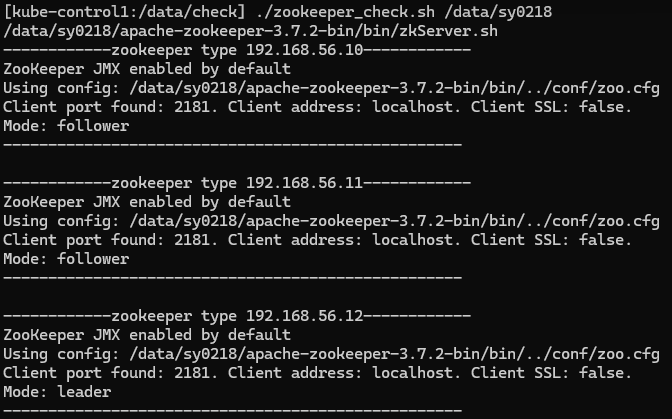
# 카프카 실행 ( 각 브로커 서버에서 모두 실행 해줘야됨 )
bin/kafka-server-start.sh -daemon config/server.properties

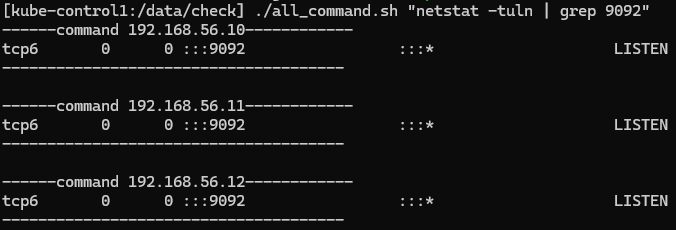
# 실행 확인 ( 9092 포트로 설정했음 )
netstat -tuln | grep 9092

# 카프카 종료 명령어 ( 각 브로커 서버에서 모드 실행 해줘야됨 )
bin/kafka-server-stop.sh
# Kafka 브로커의 API 버전을 확인
bin/kafka-broker-api-versions.sh --bootstrap-server 192.168.56.10:9092kube-node1:9092 (id: 2 rack: null) -> (
Produce(0): 0 to 9 [usable: 9],
Fetch(1): 0 to 15 [usable: 15],
ListOffsets(2): 0 to 8 [usable: 8],
Metadata(3): 0 to 12 [usable: 12],
LeaderAndIsr(4): 0 to 7 [usable: 7],
StopReplica(5): 0 to 4 [usable: 4],
UpdateMetadata(6): 0 to 8 [usable: 8],
ControlledShutdown(7): 0 to 3 [usable: 3],
OffsetCommit(8): 0 to 8 [usable: 8],
OffsetFetch(9): 0 to 8 [usable: 8],
FindCoordinator(10): 0 to 4 [usable: 4],
JoinGroup(11): 0 to 9 [usable: 9],
Heartbeat(12): 0 to 4 [usable: 4],
LeaveGroup(13): 0 to 5 [usable: 5],
SyncGroup(14): 0 to 5 [usable: 5],
DescribeGroups(15): 0 to 5 [usable: 5],
ListGroups(16): 0 to 4 [usable: 4],
SaslHandshake(17): 0 to 1 [usable: 1],
ApiVersions(18): 0 to 3 [usable: 3],
CreateTopics(19): 0 to 7 [usable: 7],
DeleteTopics(20): 0 to 6 [usable: 6],
DeleteRecords(21): 0 to 2 [usable: 2],
InitProducerId(22): 0 to 4 [usable: 4],
OffsetForLeaderEpoch(23): 0 to 4 [usable: 4],
AddPartitionsToTxn(24): 0 to 4 [usable: 4],
AddOffsetsToTxn(25): 0 to 3 [usable: 3],
EndTxn(26): 0 to 3 [usable: 3],
WriteTxnMarkers(27): 0 to 1 [usable: 1],
TxnOffsetCommit(28): 0 to 3 [usable: 3],
DescribeAcls(29): 0 to 3 [usable: 3],
CreateAcls(30): 0 to 3 [usable: 3],
DeleteAcls(31): 0 to 3 [usable: 3],
DescribeConfigs(32): 0 to 4 [usable: 4],
AlterConfigs(33): 0 to 2 [usable: 2],
AlterReplicaLogDirs(34): 0 to 2 [usable: 2],
DescribeLogDirs(35): 0 to 4 [usable: 4],
SaslAuthenticate(36): 0 to 2 [usable: 2],
CreatePartitions(37): 0 to 3 [usable: 3],
CreateDelegationToken(38): 0 to 3 [usable: 3],
RenewDelegationToken(39): 0 to 2 [usable: 2],
ExpireDelegationToken(40): 0 to 2 [usable: 2],
DescribeDelegationToken(41): 0 to 3 [usable: 3],
DeleteGroups(42): 0 to 2 [usable: 2],
ElectLeaders(43): 0 to 2 [usable: 2],
IncrementalAlterConfigs(44): 0 to 1 [usable: 1],
AlterPartitionReassignments(45): 0 [usable: 0],
ListPartitionReassignments(46): 0 [usable: 0],
OffsetDelete(47): 0 [usable: 0],
DescribeClientQuotas(48): 0 to 1 [usable: 1],
AlterClientQuotas(49): 0 to 1 [usable: 1],
DescribeUserScramCredentials(50): 0 [usable: 0],
AlterUserScramCredentials(51): 0 [usable: 0],
DescribeQuorum(55): UNSUPPORTED,
AlterPartition(56): 0 to 3 [usable: 3],
UpdateFeatures(57): 0 to 1 [usable: 1],
Envelope(58): 0 [usable: 0],
DescribeCluster(60): 0 [usable: 0],
DescribeProducers(61): 0 [usable: 0],
UnregisterBroker(64): UNSUPPORTED,
DescribeTransactions(65): 0 [usable: 0],
ListTransactions(66): 0 [usable: 0],
AllocateProducerIds(67): 0 [usable: 0],
ConsumerGroupHeartbeat(68): UNSUPPORTED
)
kube-data1:9092 (id: 3 rack: null) -> (
Produce(0): 0 to 9 [usable: 9],
Fetch(1): 0 to 15 [usable: 15],
ListOffsets(2): 0 to 8 [usable: 8],
Metadata(3): 0 to 12 [usable: 12],
LeaderAndIsr(4): 0 to 7 [usable: 7],
StopReplica(5): 0 to 4 [usable: 4],
UpdateMetadata(6): 0 to 8 [usable: 8],
ControlledShutdown(7): 0 to 3 [usable: 3],
OffsetCommit(8): 0 to 8 [usable: 8],
OffsetFetch(9): 0 to 8 [usable: 8],
FindCoordinator(10): 0 to 4 [usable: 4],
JoinGroup(11): 0 to 9 [usable: 9],
Heartbeat(12): 0 to 4 [usable: 4],
LeaveGroup(13): 0 to 5 [usable: 5],
SyncGroup(14): 0 to 5 [usable: 5],
DescribeGroups(15): 0 to 5 [usable: 5],
ListGroups(16): 0 to 4 [usable: 4],
SaslHandshake(17): 0 to 1 [usable: 1],
ApiVersions(18): 0 to 3 [usable: 3],
CreateTopics(19): 0 to 7 [usable: 7],
DeleteTopics(20): 0 to 6 [usable: 6],
DeleteRecords(21): 0 to 2 [usable: 2],
InitProducerId(22): 0 to 4 [usable: 4],
OffsetForLeaderEpoch(23): 0 to 4 [usable: 4],
AddPartitionsToTxn(24): 0 to 4 [usable: 4],
AddOffsetsToTxn(25): 0 to 3 [usable: 3],
EndTxn(26): 0 to 3 [usable: 3],
WriteTxnMarkers(27): 0 to 1 [usable: 1],
TxnOffsetCommit(28): 0 to 3 [usable: 3],
DescribeAcls(29): 0 to 3 [usable: 3],
CreateAcls(30): 0 to 3 [usable: 3],
DeleteAcls(31): 0 to 3 [usable: 3],
DescribeConfigs(32): 0 to 4 [usable: 4],
AlterConfigs(33): 0 to 2 [usable: 2],
AlterReplicaLogDirs(34): 0 to 2 [usable: 2],
DescribeLogDirs(35): 0 to 4 [usable: 4],
SaslAuthenticate(36): 0 to 2 [usable: 2],
CreatePartitions(37): 0 to 3 [usable: 3],
CreateDelegationToken(38): 0 to 3 [usable: 3],
RenewDelegationToken(39): 0 to 2 [usable: 2],
ExpireDelegationToken(40): 0 to 2 [usable: 2],
DescribeDelegationToken(41): 0 to 3 [usable: 3],
DeleteGroups(42): 0 to 2 [usable: 2],
ElectLeaders(43): 0 to 2 [usable: 2],
IncrementalAlterConfigs(44): 0 to 1 [usable: 1],
AlterPartitionReassignments(45): 0 [usable: 0],
ListPartitionReassignments(46): 0 [usable: 0],
OffsetDelete(47): 0 [usable: 0],
DescribeClientQuotas(48): 0 to 1 [usable: 1],
AlterClientQuotas(49): 0 to 1 [usable: 1],
DescribeUserScramCredentials(50): 0 [usable: 0],
AlterUserScramCredentials(51): 0 [usable: 0],
DescribeQuorum(55): UNSUPPORTED,
AlterPartition(56): 0 to 3 [usable: 3],
UpdateFeatures(57): 0 to 1 [usable: 1],
Envelope(58): 0 [usable: 0],
DescribeCluster(60): 0 [usable: 0],
DescribeProducers(61): 0 [usable: 0],
UnregisterBroker(64): UNSUPPORTED,
DescribeTransactions(65): 0 [usable: 0],
ListTransactions(66): 0 [usable: 0],
AllocateProducerIds(67): 0 [usable: 0],
ConsumerGroupHeartbeat(68): UNSUPPORTED
)
kube-control1:9092 (id: 1 rack: null) -> (
Produce(0): 0 to 9 [usable: 9],
Fetch(1): 0 to 15 [usable: 15],
ListOffsets(2): 0 to 8 [usable: 8],
Metadata(3): 0 to 12 [usable: 12],
LeaderAndIsr(4): 0 to 7 [usable: 7],
StopReplica(5): 0 to 4 [usable: 4],
UpdateMetadata(6): 0 to 8 [usable: 8],
ControlledShutdown(7): 0 to 3 [usable: 3],
OffsetCommit(8): 0 to 8 [usable: 8],
OffsetFetch(9): 0 to 8 [usable: 8],
FindCoordinator(10): 0 to 4 [usable: 4],
JoinGroup(11): 0 to 9 [usable: 9],
Heartbeat(12): 0 to 4 [usable: 4],
LeaveGroup(13): 0 to 5 [usable: 5],
SyncGroup(14): 0 to 5 [usable: 5],
DescribeGroups(15): 0 to 5 [usable: 5],
ListGroups(16): 0 to 4 [usable: 4],
SaslHandshake(17): 0 to 1 [usable: 1],
ApiVersions(18): 0 to 3 [usable: 3],
CreateTopics(19): 0 to 7 [usable: 7],
DeleteTopics(20): 0 to 6 [usable: 6],
DeleteRecords(21): 0 to 2 [usable: 2],
InitProducerId(22): 0 to 4 [usable: 4],
OffsetForLeaderEpoch(23): 0 to 4 [usable: 4],
AddPartitionsToTxn(24): 0 to 4 [usable: 4],
AddOffsetsToTxn(25): 0 to 3 [usable: 3],
EndTxn(26): 0 to 3 [usable: 3],
WriteTxnMarkers(27): 0 to 1 [usable: 1],
TxnOffsetCommit(28): 0 to 3 [usable: 3],
DescribeAcls(29): 0 to 3 [usable: 3],
CreateAcls(30): 0 to 3 [usable: 3],
DeleteAcls(31): 0 to 3 [usable: 3],
DescribeConfigs(32): 0 to 4 [usable: 4],
AlterConfigs(33): 0 to 2 [usable: 2],
AlterReplicaLogDirs(34): 0 to 2 [usable: 2],
DescribeLogDirs(35): 0 to 4 [usable: 4],
SaslAuthenticate(36): 0 to 2 [usable: 2],
CreatePartitions(37): 0 to 3 [usable: 3],
CreateDelegationToken(38): 0 to 3 [usable: 3],
RenewDelegationToken(39): 0 to 2 [usable: 2],
ExpireDelegationToken(40): 0 to 2 [usable: 2],
DescribeDelegationToken(41): 0 to 3 [usable: 3],
DeleteGroups(42): 0 to 2 [usable: 2],
ElectLeaders(43): 0 to 2 [usable: 2],
IncrementalAlterConfigs(44): 0 to 1 [usable: 1],
AlterPartitionReassignments(45): 0 [usable: 0],
ListPartitionReassignments(46): 0 [usable: 0],
OffsetDelete(47): 0 [usable: 0],
DescribeClientQuotas(48): 0 to 1 [usable: 1],
AlterClientQuotas(49): 0 to 1 [usable: 1],
DescribeUserScramCredentials(50): 0 [usable: 0],
AlterUserScramCredentials(51): 0 [usable: 0],
DescribeQuorum(55): UNSUPPORTED,
AlterPartition(56): 0 to 3 [usable: 3],
UpdateFeatures(57): 0 to 1 [usable: 1],
Envelope(58): 0 [usable: 0],
DescribeCluster(60): 0 [usable: 0],
DescribeProducers(61): 0 [usable: 0],
UnregisterBroker(64): UNSUPPORTED,
DescribeTransactions(65): 0 [usable: 0],
ListTransactions(66): 0 [usable: 0],
AllocateProducerIds(67): 0 [usable: 0],
ConsumerGroupHeartbeat(68): UNSUPPORTED
)
3. kafka 토픽 생성 및 테스트
(1) kafka topic 생성
>>> 브로커중 하나로 명령어 실행
# 토픽 생성
bin/kafka-topics.sh --create \
--bootstrap-server 192.168.56.10:9092 \
--topic test-topic

# 토픽 확인
bin/kafka-topics.sh --list --bootstrap-server 192.168.56.10:9092

# 토픽 삭제 명령
kafka-topics.sh --delete --topic test-topic \
--bootstrap-server localhost:9092
(2) kafka test
# 메시지 생산 ( 프로듀서 )
bin/kafka-console-producer.sh --broker-list 192.168.56.11:9092 --topic test-topic

# 메시지 소비 ( 컨슈머 )
bin/kafka-console-consumer.sh --bootstrap-server 192.168.56.12:9092 --topic test-topic --from-beginning
kafka 간단 설치 및 테스트 실습 완료!!

4. kafka Topic 로그 데이터 받아오기
(1) kafka topic 생성
#!/usr/bin/bash

# 인자 개수 확인
if [ "$#" -ne 1 ]; then
        echo "Usage: $0 <date>"
        exit 1
fi

# 레플리케이션2, 파티션3 ( 차후 컨슈머 병렬 처리 위해 )
# 현재 날짜를 저장
now_dt=$1

# 브로커 IP와 포트를 배열로 정의
BROKERS=("192.168.56.10" "192.168.56.11" "192.168.56.12")
PORT=9092
TOPIC="key_log_${now_dt}"

# 모든 브로커에 대해 포트 열림 여부를 확인
for BROKER in "${BROKERS[@]}"; do
        if ! nc -z "$BROKER" "$PORT"; then
                echo "Error: Unable to connect to kafka server $BROKER:$PORT" >&2
                exit 1
        else
                echo "Success: Connected to kafka server $BROKER:$PORT"
        fi
done

# 토픽 존재 여부 확인
if kafka-topics.sh --list --bootstrap-server "${BROKERS[0]}:$PORT" | grep -q "^$TOPIC$"; then
        echo "Topic $TOPIC already exists. Exiting."
        exit 0
fi


# kafka 토픽 생성
kafka-topics.sh --create --topic "${TOPIC}" \
--partitions 3 \
--replication-factor 2 \
--bootstrap-server "${BROKERS[0]}:$PORT"

# 정상 실행 확인
if [ $? -eq 0 ]; then # $? >>> 마지막 명령어 종료 상태 확인하는 특별한 변수
        echo "kafka topic key_log_${now_dt} created"
else
        echo "Failed created kafka topic key_log_${now_dt}" >&2
        exit 1
fi
실행 확인 ( 토픽 미 존재시, 존재시 )


(2) kafka 프로듀서
kafka-python 호환성
https://github.com/dpkp/kafka-python/releases
Releases · dpkp/kafka-python
Python client for Apache Kafka. Contribute to dpkp/kafka-python development by creating an account on GitHub.
github.com
# 카프카 파이썬 설치
pip install kafka-python
play_get_log.py ( 카프카 프로듀서 )
#!/usr/bin/python3
from evdev import InputDevice, categorize, ecodes, list_devices
import os
import subprocess
import time
from datetime import datetime

from kafka import KafkaProducer

def input_events(broker, topic, username):
    dev = InputDevice('/dev/input/event2')
    producer = KafkaProducer(bootstrap_servers=broker) # 프로듀서 객체 생성

    try:
        for event in dev.read_loop():
            event_str = str(categorize(event))
            if ("key event at" in event_str) and ("down" in event_str):
                user_key_log = event_str + '\t' + str(username)
                producer.send(topic, user_key_log.encode('utf-8'))
                producer.flush() # 메시지 바로 전송
    finally:
        producer.close() # 객체 종료

if __name__ == "__main__":
    username=os.getenv('USER')
    today=datetime.now().strftime('%Y%m%d')
    broker_address = ['192.168.56.10:9092', '192.168.56.11:9092', '192.168.56.12:9092'] # kafka 브로커 주소
    topic_name = f"key_log_{today}" # 토픽명

    input_events(broker_address, topic_name ,username)
play.sh ( 프로듀서 동작을 트리거 하는 스크립트 )
#!/usr/bin/bash
/data/keyboard_sc/play_get_log.py &

PID=$(ps aux | grep 'play_get_log.py' | grep -v grep | awk '{print $2}')

# trap는 특정 시그널시 지정 명령어 실행하는 기능
trap "kill $PID" TERM INT
tail -f /dev/null
>>> play.sh 실행시 키로그 데이터가 카프카 브로커 토픽에 쌓이기 시작!!
토픽 데이터 확인
kafka-console-consumer.sh --bootstrap-server 192.168.56.10:9092,192.168.56.11:9092,192.168.56.12:9092 \
--topic key_log_20240830 \
--from-beginning

5. kafka 컨슈머
kafka consumer를 사용하여 topic의 데이터 소비
(1) kafka consumer
mp_kafka_consumer.py
#!/usr/bin/python3
from kafka import KafkaConsumer, TopicPartition
from kafka.admin import KafkaAdminClient
import os
import sys
import concurrent.futures

def consumer_partition(servers, topic, partition, output_file, consum_group):
    # 파티션에 따른 컨슈머 생성
    consumer = KafkaConsumer(
        bootstrap_servers=servers,
        group_id=consum_group, # 컨슈머 그룹 id
        auto_offset_reset='earliest', # 처음부터 메시지 읽음
        enable_auto_commit=False, # 자동 커밋 안함
        consumer_timeout_ms=1000 # 컨슈머가 새로운 메시지를 기다리는 시간을 1초로 지정
    )
    partition = TopicPartition(topic, partition)
    # 컨슈머 특정 파티션 할당
    consumer.assign([partition])

    # 파티션 오프셋 처음으로 설정
    consumer.seek_to_beginning(partition)

    with open(output_file, 'a') as f:
        for message in consumer:
            f.write(f"{message.value.decode('utf-8')}\n")


def main(servers, topic, output_file, consum_group):
    # 디렉토리 미 존재시 생성
    os.makedirs(os.path.dirname(output_file), exist_ok=True)

    # 토픽 파티션 수를 알아내기 위한 api 호출
    admin_client = KafkaAdminClient(bootstrap_servers=servers) # api 호출을 위한 객체 생성
    topic_metadata = admin_client.describe_topics([topic])[0]
    partitions = topic_metadata.get('partitions', [])
    print(partitions)

    # 병렬 처리
    with concurrent.futures.ThreadPoolExecutor() as executor:
        consumer_jobs = []
        for partition_info in partitions:
            partition = partition_info['partition']
            # 특정 함수 비동기 실행
            # consumer_partition 함수 실행
            # 함수 실행 인자 servers, topic, partition, output_file
            consumer_job = executor.submit(consumer_partition, servers, topic, partition, output_file, consum_group)
            consumer_jobs.append(consumer_job)

        # 모든 스레드 완료시까지 기다림
        concurrent.futures.wait(consumer_jobs)


if __name__ == "__main__":
    script_name = os.path.basename(__file__)

    args = sys.argv[1:]
    # 인자가 3개가 아니면 종료
    if len(args) != 4:
        print(f"사용법: {script_name} <bootstrap_servers> <topic> <output_file> <consum_group>")
        sys.exit(1)

    # 각 인자를 변수로 지정
    servers, topic, output_file, consum_group = args

    # output_file이 존재하면 삭제하여 멱등성 보장
    if os.path.exists(output_file):
        os.remove(output_file)

    # main 함수 호출
    main(servers, topic, output_file, consum_group)
실행 명령어
./mp_kafka_consumer.py 192.168.219.10:9092,192.168.219.11:9092,192.168.219.12:9092 key_log_20240911 /data/keyboard_sc/row_data/keylog/20240911/mp_keylog_20240911.txt mp_keylog_20240911
데이터 확인

6. 실제 메크로 데이터 수집 & 웨어 하우징
- 사용 프로그램 : key_macro

(1) keylog 전처리 ( PYSPARK )
from pyspark.sql import SparkSession
from pyspark.sql.functions import col, regexp_replace, split, udf
from pyspark.sql.types import StringType
import os
import subprocess
import sys

def _ppc_key_active(key_active_str):
    key_active_str = key_active_str.strip()
    key_active_str = key_active_str.replace('(','').replace(')','')
    return key_active_str

# UDF 등록
key_active_udf = udf(_ppc_key_active, StringType())


def main(file_name, file_dir):
    # Spark 세션 생성
    spark = SparkSession.builder.appName("DataProcessing").master("local[*]").getOrCreate()
    # 파일 경로
    input_file = f"file://{file_dir}/{file_name}"

    # 데이터 읽기
    df = spark.read.text(input_file)

    # DataFrame 출력
    df.show(truncate=False)

    # 데이터 처리
    df = df.filter(df.value.contains("key event at") & df.value.contains("down"))
    df = df.withColumn('line', split(col('value'), ','))
    df = df.withColumn('key_log_time', split(col('line')[0], ' ')[3])
    df = df.withColumn('key_active', key_active_udf(split(col('line')[1], ' ')[2]))
    df = df.withColumn('user_id', split(col('line')[2], '\t')[1])
    # 필요한 열만 선택
    df = df.select('key_log_time','key_active','user_id')
    df.show(truncate=False)

    # 파일 저장 경로 및 Parquet 형식으로 저장
    output_path = os.path.dirname(input_file.replace("file://", ""))
    df.write.mode("overwrite").parquet(output_path)

    # 스파크 세션 종료
    spark.stop()

    # hdfs에서 파일 이름 변경
    subprocess.run(["hdfs", "dfs", "-mv", f"{output_path}/*.parquet", f"{output_path}/key_log.parquet"], check=True)

if __name__ == "__main__":
    args = sys.argv[1:]
    # 인자 두개 아니면 종료
    if len(args) != 2:
        print("사용법 : py <파일명> <파일경로>")
        sys.exit(1)

    file_name, file_dir = args
    main(file_name, file_dir)
실행 예시
spark-submit ch_data.py mp_keylog_20240904.txt /data/keyboard_sc/row_data/keylog/20240904
하둡 parquet 저장 확인

(2) hive에 데이터 insert
keylog.hql
drop table keylog;

CREATE TABLE keylog_raw (
    key_log_time STRING,
    key_active STRING,
    user_id STRING
)
PARTITIONED BY (pdate STRING)
STORED AS PARQUET;
실행 예시
# hive 테이블 생성
hive -f keylog.hql

# raw 데이터 hive 웨어하우스로 넣기
hive -e "set mapred.job.priority=VERY_HIGH;load data inpath '/data/keyboard_sc/row_data/keylog/20240904/key_log.parquet' overwrite into table keylog_raw partition (pdate='20240904')"
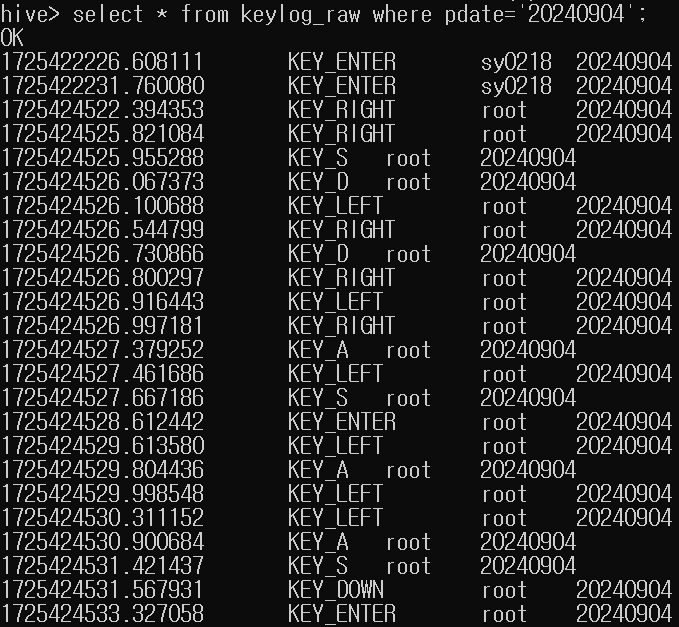
hive 저장 확인
[ docker compose ]
version: '3.7'
######### airflow env #########
x-environment: &airflow_environment
    AIRFLOW__CORE__EXECUTOR: "SequentialExecutor"
    AIRFLOW__CORE__LOAD_DEFAULT_CONNECTIONS: "False"
    AIRFLOW__CORE__LOAD_EXAMPLES: "False"
    AIRFLOW__CORE__SQL_ALCHEMY_CONN: "sqlite:////opt/airflow/airflow.db"
    AIRFLOW__CORE__STORE_DAG_CODE: "True"
    AIRFLOW__CORE__STORE_SERIALIZED_DAGS: "True"
    AIRFLOW__WEBSERVER__EXPOSE_CONFIG: "True"
    AIRFLOW__WEBSERVER__RBAC: "False"
######### airflow env #########
services:
  airflow:
    build: /data/keyboard_sc/work_airflow/docker_images/docker_airflow
    image: airflow/airflow_sy0218:2.9.3
    container_name: airflow_container
    ports:
      - "9898:8080"
    volumes:
      - /data/keyboard_sc/work_airflow/dag_airflow/:/opt/airflow/dags/
      - /data/keyboard_sc/row_data:/data/keyboard_sc/row_data
      - /var/run/docker.sock:/var/run/docker.sock
    networks:
      - keylog_airflow
    environment: *airflow_environment

networks:
  keylog_airflow:
    name: keylog_airflow
[ airflow dag ]
import datetime as dt
from pathlib import Path

from airflow import DAG
from airflow.operators.bash import BashOperator
from airflow.operators.python import PythonOperator
from airflow.sensors.python import PythonSensor
from airflow.providers.ssh.operators.ssh import SSHOperator

# dag 정의
dag = DAG(
    dag_id="keylog_airflow",
    start_date=dt.datetime.now(), # 현재 시각을 start_date로 설정
    schedule_interval=None, # 테스트이기에 스케줄 인터벌 None로 설정 ( 나중에 매 00시로 변경 )
)

# TASK에 변수를 전달하기 위한 XCOM
def _keylog_xcom(**kwargs):
    xcom_key = kwargs['ti']
    execution_date = kwargs['execution_date']
    #execution_date = kwargs['execution_date'] - dt.timedelta(days=1) # 하루 뺴기
    execution_date = execution_date.strftime('%Y%m%d') # 날짜를 원하는 형식으로 변환
    xcom_key.xcom_push(key='row_dir', value='/data/keyboard_sc/row_data/keylog')
    xcom_key.xcom_push(key='batch_date', value=execution_date)
    xcom_key.xcom_push(key='hdfs_file_name', value='key_log.parquet')
    xcom_key.xcom_push(key='hive_table_name', value='keylog_raw')
push_xcom = PythonOperator(
    task_id='push_xcom',
    python_callable=_keylog_xcom,
    provide_context=True,
    dag=dag,
)

# keylog 원시데이터 모드 가져올떄까지 대기하는 Sensor
def _wait_for_rowdata(**kwargs):
    xcom_key = kwargs['ti']
    row_dir = xcom_key.xcom_pull(task_ids='push_xcom', key='row_dir')
    batch_date = xcom_key.xcom_pull(task_ids='push_xcom', key='batch_date')

    # 로그에 출력 확인
    print(f"Row Directory: {row_dir}")
    print(f"Batch Date: {batch_date}")

    keylog_row_path = Path(f"{row_dir}/{batch_date}")
    data_files = keylog_row_path / f"mp_keylog_{batch_date}.txt"
    success_file = keylog_row_path / "__SUCCESS__"

    # 센서 조건 지정
    if success_file.exists() and data_files:
        return True
    return False

wait_keylog_rowdata = PythonSensor(
    task_id="wait_keylog_rowdata",
    python_callable=_wait_for_rowdata,
    mode="reschedule",
    dag=dag,
)

# 스파크 실행하는 SSHOperator
keylog_preprocesing = SSHOperator(
    task_id="preprocessing_use_spark",
    ssh_conn_id='apserver_ssh',
    command=(
        "spark-submit /data/keyboard_sc/pyspark_keylog/ch_data.py mp_keylog_{{ ti.xcom_pull(task_ids='push_xcom', key='batch_date') }}.txt {{ ti.xcom_pull(task_ids='push_xcom', key='row_dir') }}/{{ ti.xcom_pull(task_ids='push_xcom', key='batch_date') }}"
    ),
    dag=dag,
)

# hive 웨어하우스 적재하는 SSHOperator
keylog_to_hive = SSHOperator(
    task_id="to_hive",
    ssh_conn_id='apserver_ssh',
    command=(
        "/data/keyboard_sc/hive/hadoop_to_hive.sh {{ ti.xcom_pull(task_ids='push_xcom', key='batch_date') }} {{ ti.xcom_pull(task_ids='push_xcom', key='row_dir') }} {{ ti.xcom_pull(task_ids='push_xcom', key='hdfs_file_name') }} {{ ti.xcom_pull(task_ids='push_xcom', key='hive_table_name') }}"
    ),
    dag=dag,
)

# 의존성 정의
push_xcom >> wait_keylog_rowdata >> keylog_preprocesing >> keylog_to_hive
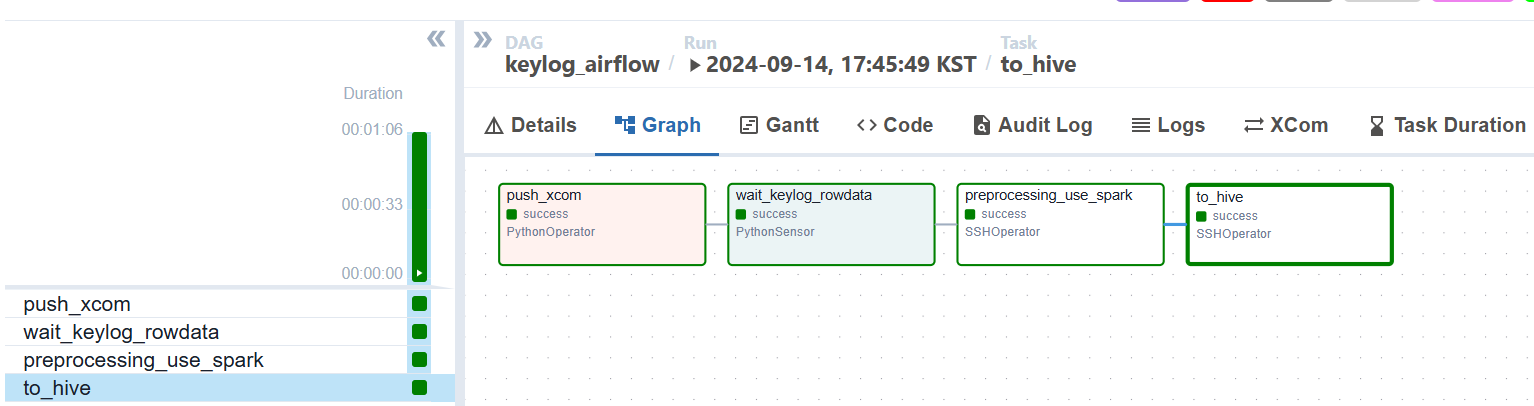
keylog_to_hive 태스크에서 에러발생...ㅠㅠ
ssh command timed out???!!!?!!!!
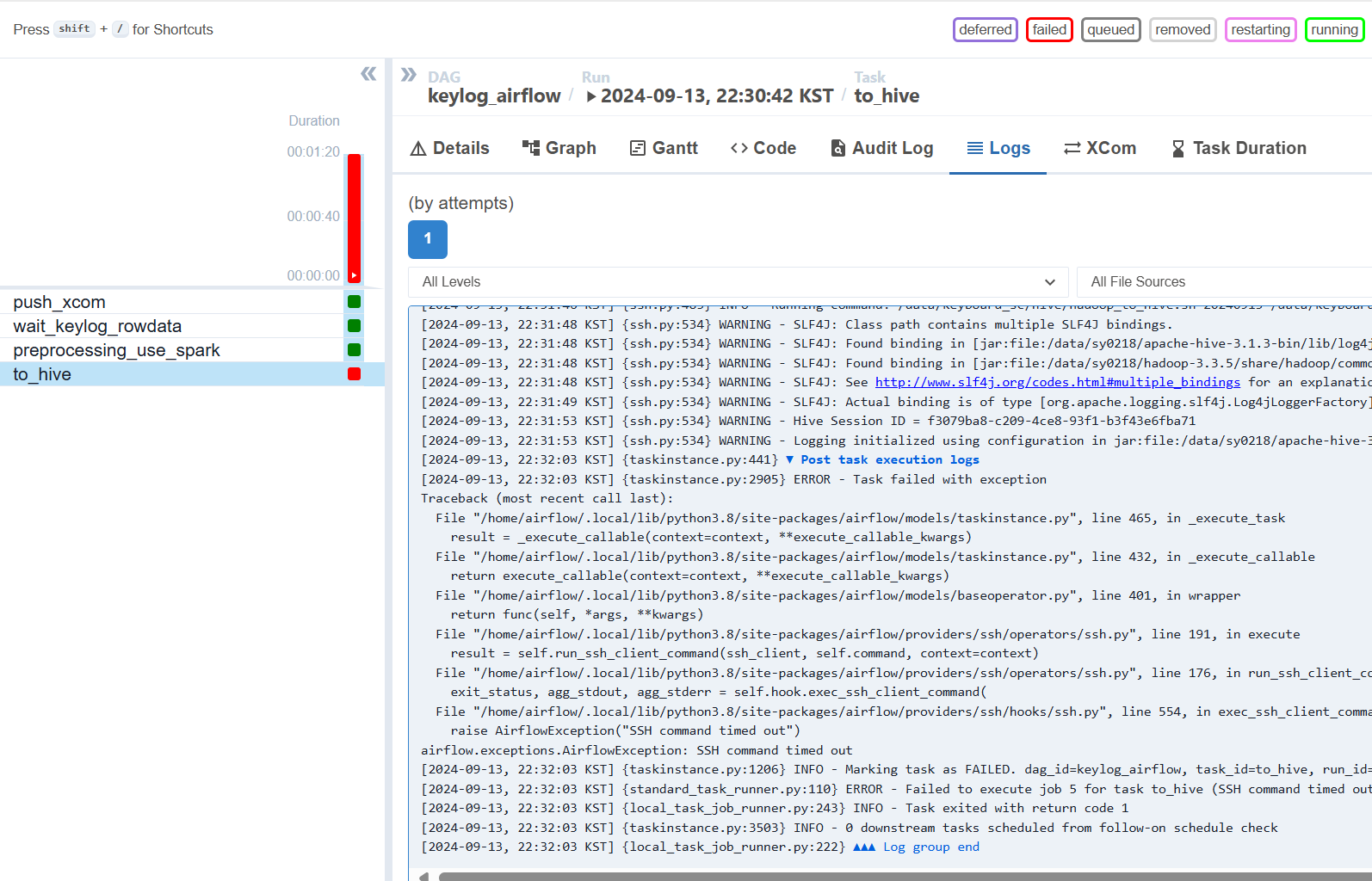
cmd_timeout 설정 해주기
# hive 웨어하우스 적재하는 SSHOperator
keylog_to_hive = SSHOperator(
    task_id="to_hive",
    ssh_conn_id='apserver1_ssh',
    command=(
        "bash /data/keyboard_sc/hive/hadoop_to_hive.sh "
        "{{ ti.xcom_pull(task_ids='push_xcom', key='row_dir') }} "
        "{{ ti.xcom_pull(task_ids='push_xcom', key='batch_date') }} "
        "{{ ti.xcom_pull(task_ids='push_xcom', key='hdfs_file_name') }} "
        "{{ ti.xcom_pull(task_ids='push_xcom', key='hive_table_name') }} "
    ),
    cmd_timeout=360, # 5분 으로 설정
    dag=dag,
)
실행 완료 확인!!