하둡 클러스터 운영( 도커 컨테이너 ) 실습[하둡]
1. 하둡 (컨테이너)
하둡은 대규모 데이터 처리를 위해 설계된 오픈 소스 소프트웨어 프레임워크입니다.
분산 저장 및 분산 처리를 지원하며, 대량의 데이터를 효율적으로 처리할 수 있는 기능을 제공!!
하둡은 주로 HDFS와 MapReduce 컴포넌트로 구성되어 있으며,
추가적으로 YARN과 Hadoop Common 라이브러리로 구성
1-1. 하둡 설치
0. tar파일 가져오기
cd /data/download_tar
wget https://downloads.apache.org/hadoop/common/hadoop-3.3.5/hadoop-3.3.5.tar.gz

1. tar파일 원하는 경로에 풀기
tar xzvf hadoop-3.3.5.tar.gz -C /data/sy0218

2. 필요 디렉터리 생성
mkdir -p /hadoop/data
mkdir -p /hadoop/data1
mkdir -p /hadoop/data2
mkdir -p /hadoop/hdfs
mkdir -p /hadoop/hdfs_work
mkdir -p /hadoop/jn
2. 하둡 (설정)
2-1. core-site.xml : 하둡 클러스터의 공통 설정을 정의
vim /data/sy0218/hadoop-3.3.5/etc/hadoop/core-site.xml
<?xml version="1.0" encoding="UTF-8"?>
<?xml-stylesheet type="text/xsl" href="configuration.xsl"?>
<!--
  Licensed under the Apache License, Version 2.0 (the "License");
  you may not use this file except in compliance with the License.
  You may obtain a copy of the License at

    http://www.apache.org/licenses/LICENSE-2.0

  Unless required by applicable law or agreed to in writing, software
  distributed under the License is distributed on an "AS IS" BASIS,
  WITHOUT WARRANTIES OR CONDITIONS OF ANY KIND, either express or implied.
  See the License for the specific language governing permissions and
  limitations under the License. See accompanying LICENSE file.
-->

<configuration>
        <property>
                        # HDFS의 기본 파일 시스템 이름을 지정합니다. 여기서는
                # hdfs://nn1:9000으로 설정되어 있으므로
                # 클라이언트가 HDFS에 액세스할 때
                # 기본적으로 nn1 노드의 9000번 포트를 사용
                <name>fs.default.name</name>
                <value>hdfs://192.168.56.10:9000</value>
        </property>
        <property>
                        #  HDFS 네임스페이스 my-hadoop-cluster를 기본 파일 시스템으로 사용하도록 설정
                <name>fs.defaultFS</name>
                <value>hdfs://my-hadoop-cluster</value>
        </property>
        <property>
                <name>hadoop.tmp.dir</name>
                <value>file:///hadoop/hdfs_work/hadoop-root</value>
                <description>hadoop 임시 디렉토리</description>
        </property>

        <property>
                        # Hadoop 클러스터의 고가용성 (HA) 구성을 위해 사용되는 ZooKeeper 서버의 주소를 지정
                <name>ha.zookeeper.quorum</name>
                <value>192.168.56.10:2181,192.168.56.11:2181,192.168.56.12:2181</value>
        </property>
</configuration>
2-2. hdfs-site.xml : HDFS 클러스터의 다양한 속성을 설정하고 구성
vim /data/sy0218/hadoop-3.3.5/etc/hadoop/hdfs-site.xml
<?xml version="1.0" encoding="UTF-8"?>
<?xml-stylesheet type="text/xsl" href="configuration.xsl"?>
<!--
  Licensed under the Apache License, Version 2.0 (the "License");
  you may not use this file except in compliance with the License.
  You may obtain a copy of the License at

    http://www.apache.org/licenses/LICENSE-2.0

  Unless required by applicable law or agreed to in writing, software
  distributed under the License is distributed on an "AS IS" BASIS,
  WITHOUT WARRANTIES OR CONDITIONS OF ANY KIND, either express or implied.
  See the License for the specific language governing permissions and
  limitations under the License. See accompanying LICENSE file.
-->

<!-- Put site-specific property overrides in this file. -->

<configuration>
    <!-- configuration hadoop -->
    <property>
        # 파일 복제 수를 지정
        <name>dfs.replication</name>
        <value>2</value>
    </property>
    <property>
        # NameNode의 메타데이터를 저장할 디렉토리 경로
        <name>dfs.namenode.name.dir</name>
        <value>file:///hadoop/hdfs/nn</value>
    </property>
    <property>
        # DataNode의 데이터 블록을 저장할 디렉토리 경로
        <name>dfs.datanode.data.dir</name>
        <value>file:///hadoop/data1,file:///hadoop/data2</value>
    </property>
    <property>
        # JournalNode의 트랜잭션 로그 파일을 저장할 디렉토리 경로
        <name>dfs.journalnode.edits.dir</name>
        <value>/hadoop/jn</value>
    </property>
    <property>
        # HDFS 네임서비스의 이름
        <name>dfs.nameservices</name>
        <value>my-hadoop-cluster</value>
    </property>
    <property>
        # 네임노드의 하이언 노드 이름 목록을 지정
        <name>dfs.ha.namenodes.my-hadoop-cluster</name>
        <value>namenode1,namenode2</value>
    </property>
    <property>
        # 네임노드의 RPC 주소를 지정
        <name>dfs.namenode.rpc-address.my-hadoop-cluster.namenode1</name>
        <value>192.168.56.10:8020</value>
    </property>
    <property>
        # 네임노드의 RPC 주소를 지정
        <name>dfs.namenode.rpc-address.my-hadoop-cluster.namenode2</name>
        <value>192.168.56.11:8020</value>
    </property>
    <property>
        # 네임노드의 HTTP 주소를 지정
        <name>dfs.namenode.http-address.my-hadoop-cluster.namenode1</name>
        <value>192.168.56.10:50070</value>
    </property>
    <property>
        # 네임노드의 HTTP 주소를 지정
        <name>dfs.namenode.http-address.my-hadoop-cluster.namenode2</name>
        <value>192.168.56.11:50070</value>
    </property>
    <property>
        # 네임노드 간의 공유 트랜잭션 로그 디렉토리를 지정
        <name>dfs.namenode.shared.edits.dir</name>
        <value>qjournal://192.168.56.10:8485;192.168.56.11:8485;192.168.56.12:8485/my-hadoop-cluster</value>
    </property>
    <property>
        # 클라이언트 장애 조치(Failover) 프록시 제공자를 지정
        <name>dfs.client.failover.proxy.provider.my-hadoop-cluster</name>
        <value>org.apache.hadoop.hdfs.server.namenode.ha.ConfiguredFailoverProxyProvider</value>
    </property>
    <property>
        # 네임노드 장애 조치 시 사용되는 팬싱(fencing) 메서드를 지정
        <name>dfs.ha.fencing.methods</name>
        <value>shell(/bin/true)</value>
    </property>
    <property>
        # SSH 팬싱을 위한 개인 키 파일의 경로를 지정
        <name>dfs.ha.fencing.ssh.private-key-files</name>
        <value>/root/.ssh/id_rsa</value>
    </property>
    <property>
        # 자동 장애 조치(Failover)를 활성화
        <name>dfs.ha.automatic-failover.enabled</name>
        <value>true</value>
    </property>
    <property>
        # HDFS 네임노드의 데이터 디렉토리 경로
        <name>dfs.name.dir</name>
        <value>/hadoop/data/name</value>
    </property>
    <property>
        # HDFS 데이터 노드의 데이터 디렉토리 경로
        <name>dfs.data.dir</name>
        <value>/hadoop/data/data</value>
    </property>
</configuration>
2-3. mapred-site.xml : 맵리듀스(MapReduce)와 관련된 설정
- 맵리듀스는 Hadoop 클러스터에서 대규모 데이터 처리 작업을 수행하는데 사용되는 분산 처리 프레임워크
- Map 단계는 데이터를 분산 처리하여 중간 결과를 생성하고, Reduce 단계는 이 중간 결과를 취합하여 최종 결과를 생성
- 셔플 단계는 Map 태스크의 출력 데이터를 Reduce 태스크로 전송하는 단계
vim /data/sy0218/hadoop-3.3.5/etc/hadoop/mapred-site.xml
<?xml version="1.0"?>
<?xml-stylesheet type="text/xsl" href="configuration.xsl"?>
<!--
  Licensed under the Apache License, Version 2.0 (the "License");
  you may not use this file except in compliance with the License.
  You may obtain a copy of the License at

    http://www.apache.org/licenses/LICENSE-2.0

  Unless required by applicable law or agreed to in writing, software
  distributed under the License is distributed on an "AS IS" BASIS,
  WITHOUT WARRANTIES OR CONDITIONS OF ANY KIND, either express or implied.
  See the License for the specific language governing permissions and
  limitations under the License. See accompanying LICENSE file.
-->

<!-- Put site-specific property overrides in this file. -->

<configuration>
        <property>
                # MapReduce 프레임워크를 지정
                <name>mapreduce.framework.name</name>
                <value>yarn</value>
        </property>
        <property>
                # YARN ApplicationMaster 환경에서 사용할 환경 변수를 설정
                <name>yarn.app.mapreduce.am.env</name>
                <value>HADOOP_MAPRED_HOME=${HADOOP_HOME}</value>
        </property>
        <property>
                # Map 작업 환경에서 사용할 환경 변수를 설정
                <name>mapreduce.map.env</name>
                <value>HADOOP_MAPRED_HOME=${HADOOP_HOME}</value>
        </property>
        <property>
                #  Reduce 작업 환경에서 사용할 환경 변수를 설정
                <name>mapreduce.reduce.env</name>
                <value>HADOOP_MAPRED_HOME=${HADOOP_HOME}</value>
        </property>
</configuration>
2-4. yarn-site.xml : YARN 클러스터의 동작을 제어하는 데 사용
vim /data/sy0218/hadoop-3.3.5/etc/hadoop/yarn-site.xml
<?xml version="1.0"?>
<!--
  Licensed under the Apache License, Version 2.0 (the "License");
  you may not use this file except in compliance with the License.
  You may obtain a copy of the License at

    http://www.apache.org/licenses/LICENSE-2.0

  Unless required by applicable law or agreed to in writing, software
  distributed under the License is distributed on an "AS IS" BASIS,
  WITHOUT WARRANTIES OR CONDITIONS OF ANY KIND, either express or implied.
  See the License for the specific language governing permissions and
  limitations under the License. See accompanying LICENSE file.
-->

<configuration>
        <!-- Site specific YARN configuration properties -->
        <property>
                # MapReduce 작업 실행을 위해 필요한 보조 서비스인 mapreduce_shuffle를 사용하도록 설정
                <name>yarn.nodemanager.aux-services</name>
                <value>mapreduce_shuffle</value>
        </property>
        <property>
                # MapReduce 작업의 데이터 셔플링을 처리하는
            # org.apache.hadoop.mapred.ShuffleHandler 클래스를 사용하도록 설정
                <name>yarn.nodemanager.aux-services.mapreduce_shuffle.class</name>
                <value>org.apache.hadoop.mapred.ShuffleHandler</value>
        </property>


        <property>
                <name>yarn.resourcemanager.ha.enabled</name>
                <value>true</value>
                <description>resourcemanager HA 활성화</description>
        </property>

        <property>
                <name>yarn.resourcemanager.ha.rm-ids</name>
                <value>rm1,rm2</value>
                <description>resourcemanager ID</description>
        </property>

        <property>
                <name>yarn.resourcemanager.hostname.rm1</name>
                <value>192.168.56.10</value>
                <description>resourcemanager RM1 Hostname or ip</description>
        </property>

    <property>
                <name>yarn.resourcemanager.hostname.rm2</name>
                <value>192.168.56.11</value>
                <description>resourcemanager RM2 Hostname or ip</description>
        </property>

    <property>
                <name>yarn.resourcemanager.webapp.address.rm1</name>
                <value>192.168.56.10:8088</value>
        <description>YARN 리소스 매니저의 웹 애플리케이션 주소</description>
        </property>

    <property>
                <name>yarn.resourcemanager.webapp.address.rm2</name>
                <value>192.168.56.11:8088</value>
        <description>YARN 리소스 매니저의 웹 애플리케이션 주소</description>
        </property>

    <property>
                <name>yarn.resourcemanager.cluster-id</name>
                <value>my-hadoop-cluster</value>
                <description>YARN 클러스터를 식별하는 데 사용되는 고유한 식별자를 설정</description>
        </property>

        <property>
                <name>yarn.resourcemanager.zk-address</name>
                <value>192.168.56.10:2181,192.168.56.11:2181,192.168.56.12:2181</value>
        <description>YARN 리소스 매니저에서 ZooKeeper와 통신하기 위한 ZooKeeper 앙상블의 주소를 지정</description>
        </property>

    <property>
                <name>yarn.resourcemanager.store.class</name>
                <value>org.apache.hadoop.yarn.server.resourcemanager.recovery.ZKRMStateStore</value>
        <description>YARN 리소스 매니저에서 사용할 상태 저장소 구현 클래스를 지정</description>
        </property>

        <property>
                <name>yarn.client.failover-proxy-provider</name>
                <value>org.apache.hadoop.yarn.client.ConfiguredRMFailoverProxyProvider</value>
        <description>YARN 클라이언트가 리소스 매니저와 통신하는 데 사용하는 프록시 클래스를 지정</description>
        </property>

    <property>
                <name>yarn.resourcemanager.recovery.enabled</name>
                <value>true</value>
        <description>YARN 리소스 매니저의 상태 복구 기능을 활성화할지 여부</description>
        </property>

        <property>
                # 노드 매니저의 가상 메모리 (VMem) 검사 기능을 활성화 또는 비활성화
                <name>yarn.nodemanager.vmem-check-enabled</name>
                <value>false</value>
        </property>

        <property>
          <name>yarn.nodemanager.resource.memory-mb</name>
          <value>51200</value> <!-- 50GB, 또는 사용 가능한 전체 메모리 양 -->
        </property>
</configuration>
2-5. yarn-env.sh : YARN 서비스의 환경 변수 및 JVM 옵션을 구성
vim /data/sy0218/hadoop-3.3.5/etc/hadoop/yarn-env.sh
2-6. hadoop-env.sh : Hadoop 서비스의 환경 변수 및 JVM 옵션을 구성
vim /data/sy0218/hadoop-3.3.5/etc/hadoop/hadoop-env.sh
#
# Licensed to the Apache Software Foundation (ASF) under one
# or more contributor license agreements. See the NOTICE file
# distributed with this work for additional information
# regarding copyright ownership. The ASF licenses this file
# to you under the Apache License, Version 2.0 (the
# "License"); you may not use this file except in compliance
# with the License. You may obtain a copy of the License at
#
# http://www.apache.org/licenses/LICENSE-2.0
#
# Unless required by applicable law or agreed to in writing, software
# distributed under the License is distributed on an "AS IS" BASIS,
# WITHOUT WARRANTIES OR CONDITIONS OF ANY KIND, either express or implied.
# See the License for the specific language governing permissions and
# limitations under the License.
# Set Hadoop-specific environment variables here.
##
## THIS FILE ACTS AS THE MASTER FILE FOR ALL HADOOP PROJECTS.
## SETTINGS HERE WILL BE READ BY ALL HADOOP COMMANDS. THEREFORE,
## ONE CAN USE THIS FILE TO SET YARN, HDFS, AND MAPREDUCE
## CONFIGURATION OPTIONS INSTEAD OF xxx-env.sh.
##
## Precedence rules:
##
## {yarn-env.sh|hdfs-env.sh} > hadoop-env.sh > hard-coded defaults
##
## {YARN_xyz|HDFS_xyz} > HADOOP_xyz > hard-coded defaults
##
# Many of the options here are built from the perspective that users
# may want to provide OVERWRITING values on the command line.
# For example:
#
# JAVA_HOME=/usr/java/testing hdfs dfs -ls
#
# Therefore, the vast majority (BUT NOT ALL!) of these defaults
# are configured for substitution and not append. If append
# is preferable, modify this file accordingly.
###
# Generic settings for HADOOP
###
# Technically, the only required environment variable is JAVA_HOME.
# All others are optional. However, the defaults are probably not
# preferred. Many sites configure these options outside of Hadoop,
# such as in /etc/profile.d
# The java implementation to use. By default, this environment
# variable is REQUIRED on ALL platforms except OS X!
export JAVA_HOME=/usr/lib/jvm/java-8-openjdk-amd64
# Location of Hadoop. By default, Hadoop will attempt to determine
# this location based upon its execution path.
export HADOOP_HOME=/data/sy0218/hadoop-3.3.5
# Location of Hadoop's configuration information. i.e., where this
# file is living. If this is not defined, Hadoop will attempt to
# locate it based upon its execution path.
#
# NOTE: It is recommend that this variable not be set here but in
# /etc/profile.d or equivalent. Some options (such as
# --config) may react strangely otherwise.
#
# export HADOOP_CONF_DIR=${HADOOP_HOME}/etc/hadoop
# The maximum amount of heap to use (Java -Xmx). If no unit
# is provided, it will be converted to MB. Daemons will
# prefer any Xmx setting in their respective _OPT variable.
# There is no default; the JVM will autoscale based upon machine
# memory size.
# export HADOOP_HEAPSIZE_MAX=
# The minimum amount of heap to use (Java -Xms). If no unit
# is provided, it will be converted to MB. Daemons will
# prefer any Xms setting in their respective _OPT variable.
# There is no default; the JVM will autoscale based upon machine
# memory size.
# export HADOOP_HEAPSIZE_MIN=
# Enable extra debugging of Hadoop's JAAS binding, used to set up
# Kerberos security.
# export HADOOP_JAAS_DEBUG=true
# Extra Java runtime options for all Hadoop commands. We don't support
# IPv6 yet/still, so by default the preference is set to IPv4.
# export HADOOP_OPTS="-Djava.net.preferIPv4Stack=true"
# For Kerberos debugging, an extended option set logs more information
# export HADOOP_OPTS="-Djava.net.preferIPv4Stack=true -Dsun.security.krb5.debug=true -Dsun.security.spnego.debug"
# Some parts of the shell code may do special things dependent upon
# the operating system. We have to set this here. See the next
# section as to why....
export HADOOP_OS_TYPE=${HADOOP_OS_TYPE:-$(uname -s)}
# Extra Java runtime options for some Hadoop commands
# and clients (i.e., hdfs dfs -blah). These get appended to HADOOP_OPTS for
# such commands. In most cases, # this should be left empty and
# let users supply it on the command line.
# export HADOOP_CLIENT_OPTS=""
#
# A note about classpaths.
#
# By default, Apache Hadoop overrides Java's CLASSPATH
# environment variable. It is configured such
# that it starts out blank with new entries added after passing
# a series of checks (file/dir exists, not already listed aka
# de-deduplication). During de-deduplication, wildcards and/or
# directories are *NOT* expanded to keep it simple. Therefore,
# if the computed classpath has two specific mentions of
# awesome-methods-1.0.jar, only the first one added will be seen.
# If two directories are in the classpath that both contain
# awesome-methods-1.0.jar, then Java will pick up both versions.
# An additional, custom CLASSPATH. Site-wide configs should be
# handled via the shellprofile functionality, utilizing the
# hadoop_add_classpath function for greater control and much
# harder for apps/end-users to accidentally override.
# Similarly, end users should utilize ${HOME}/.hadooprc .
# This variable should ideally only be used as a short-cut,
# interactive way for temporary additions on the command line.
# export HADOOP_CLASSPATH="/some/cool/path/on/your/machine"
# Should HADOOP_CLASSPATH be first in the official CLASSPATH?
# export HADOOP_USER_CLASSPATH_FIRST="yes"
# If HADOOP_USE_CLIENT_CLASSLOADER is set, the classpath along
# with the main jar are handled by a separate isolated
# client classloader when 'hadoop jar', 'yarn jar', or 'mapred job'
# is utilized. If it is set, HADOOP_CLASSPATH and
# HADOOP_USER_CLASSPATH_FIRST are ignored.
# export HADOOP_USE_CLIENT_CLASSLOADER=true
# HADOOP_CLIENT_CLASSLOADER_SYSTEM_CLASSES overrides the default definition of
# system classes for the client classloader when HADOOP_USE_CLIENT_CLASSLOADER
# is enabled. Names ending in '.' (period) are treated as package names, and
# names starting with a '-' are treated as negative matches. For example,
# export HADOOP_CLIENT_CLASSLOADER_SYSTEM_CLASSES="-org.apache.hadoop.UserClass,java.,javax.,org.apache.hadoop."
# Enable optional, bundled Hadoop features
# This is a comma delimited list. It may NOT be overridden via .hadooprc
# Entries may be added/removed as needed.
# export HADOOP_OPTIONAL_TOOLS="hadoop-kafka,hadoop-aliyun,hadoop-azure,hadoop-azure-datalake,hadoop-aws"
###
# Options for remote shell connectivity
###
# There are some optional components of hadoop that allow for
# command and control of remote hosts. For example,
# start-dfs.sh will attempt to bring up all NNs, DNS, etc.
# Options to pass to SSH when one of the "log into a host and
# start/stop daemons" scripts is executed
# export HADOOP_SSH_OPTS="-o BatchMode=yes -o StrictHostKeyChecking=no -o ConnectTimeout=10s"
# The built-in ssh handler will limit itself to 10 simultaneous connections.
# For pdsh users, this sets the fanout size ( -f )
# Change this to increase/decrease as necessary.
# export HADOOP_SSH_PARALLEL=10
# Filename which contains all of the hosts for any remote execution
# helper scripts # such as workers.sh, start-dfs.sh, etc.
# export HADOOP_WORKERS="${HADOOP_CONF_DIR}/workers"
###
# Options for all daemons
###
#
#
# Many options may also be specified as Java properties. It is
# very common, and in many cases, desirable, to hard-set these
# in daemon _OPTS variables. Where applicable, the appropriate
# Java property is also identified. Note that many are re-used
# or set differently in certain contexts (e.g., secure vs
# non-secure)
#
# Where (primarily) daemon log files are stored.
# ${HADOOP_HOME}/logs by default.
# Java property: hadoop.log.dir
# export HADOOP_LOG_DIR=${HADOOP_HOME}/logs
# A string representing this instance of hadoop. $USER by default.
# This is used in writing log and pid files, so keep that in mind!
# Java property: hadoop.id.str
# export HADOOP_IDENT_STRING=$USER
# How many seconds to pause after stopping a daemon
# export HADOOP_STOP_TIMEOUT=5
# Where pid files are stored. /tmp by default.
# export HADOOP_PID_DIR=/tmp
# Default log4j setting for interactive commands
# Java property: hadoop.root.logger
# export HADOOP_ROOT_LOGGER=INFO,console
# Default log4j setting for daemons spawned explicitly by
# --daemon option of hadoop, hdfs, mapred and yarn command.
# Java property: hadoop.root.logger
# export HADOOP_DAEMON_ROOT_LOGGER=INFO,RFA
# Default log level and output location for security-related messages.
# You will almost certainly want to change this on a per-daemon basis via
# the Java property (i.e., -Dhadoop.security.logger=foo). (Note that the
# defaults for the NN and 2NN override this by default.)
# Java property: hadoop.security.logger
# export HADOOP_SECURITY_LOGGER=INFO,NullAppender
# Default process priority level
# Note that sub-processes will also run at this level!
# export HADOOP_NICENESS=0
# Default name for the service level authorization file
# Java property: hadoop.policy.file
# export HADOOP_POLICYFILE="hadoop-policy.xml"
#
# NOTE: this is not used by default! <-----
# You can define variables right here and then re-use them later on.
# For example, it is common to use the same garbage collection settings
# for all the daemons. So one could define:
#
# export HADOOP_GC_SETTINGS="-verbose:gc -XX:+PrintGCDetails -XX:+PrintGCTimeStamps -XX:+PrintGCDateStamps"
#
# .. and then use it as per the b option under the namenode.
###
# Secure/privileged execution
###
#
# Out of the box, Hadoop uses jsvc from Apache Commons to launch daemons
# on privileged ports. This functionality can be replaced by providing
# custom functions. See hadoop-functions.sh for more information.
#
# The jsvc implementation to use. Jsvc is required to run secure datanodes
# that bind to privileged ports to provide authentication of data transfer
# protocol. Jsvc is not required if SASL is configured for authentication of
# data transfer protocol using non-privileged ports.
# export JSVC_HOME=/usr/bin
#
# This directory contains pids for secure and privileged processes.
#export HADOOP_SECURE_PID_DIR=${HADOOP_PID_DIR}
#
# This directory contains the logs for secure and privileged processes.
# Java property: hadoop.log.dir
# export HADOOP_SECURE_LOG=${HADOOP_LOG_DIR}
#
# When running a secure daemon, the default value of HADOOP_IDENT_STRING
# ends up being a bit bogus. Therefore, by default, the code will
# replace HADOOP_IDENT_STRING with HADOOP_xx_SECURE_USER. If one wants
# to keep HADOOP_IDENT_STRING untouched, then uncomment this line.
# export HADOOP_SECURE_IDENT_PRESERVE="true"
###
# NameNode specific parameters
###
# Default log level and output location for file system related change
# messages. For non-namenode daemons, the Java property must be set in
# the appropriate _OPTS if one wants something other than INFO,NullAppender
# Java property: hdfs.audit.logger
# export HDFS_AUDIT_LOGGER=INFO,NullAppender
# Specify the JVM options to be used when starting the NameNode.
# These options will be appended to the options specified as HADOOP_OPTS
# and therefore may override any similar flags set in HADOOP_OPTS
#
# a) Set JMX options
# export HDFS_NAMENODE_OPTS="-Dcom.sun.management.jmxremote=true -Dcom.sun.management.jmxremote.authenticate=false -Dcohttp://m.sun.management.jmxremote.ssl=false -Dcohttp://m.sun.management.jmxremote.port=1026"
#
# b) Set garbage collection logs
# export HDFS_NAMENODE_OPTS="${HADOOP_GC_SETTINGS} -Xloggc:${HADOOP_LOG_DIR}/gc-rm.log-$(date +'%Y%m%d%H%M')"
#
# c) ... or set them directly
# export HDFS_NAMENODE_OPTS="-verbose:gc -XX:+PrintGCDetails -XX:+PrintGCTimeStamps -XX:+PrintGCDateStamps -Xloggc:${HADOOP_LOG_DIR}/gc-rm.log-$(date +'%Y%m%d%H%M')"
# this is the default:
# export HDFS_NAMENODE_OPTS="-Dhadoop.security.logger=INFO,RFAS"
###
# SecondaryNameNode specific parameters
###
# Specify the JVM options to be used when starting the SecondaryNameNode.
# These options will be appended to the options specified as HADOOP_OPTS
# and therefore may override any similar flags set in HADOOP_OPTS
#
# This is the default:
# export HDFS_SECONDARYNAMENODE_OPTS="-Dhadoop.security.logger=INFO,RFAS"
###
# DataNode specific parameters
###
# Specify the JVM options to be used when starting the DataNode.
# These options will be appended to the options specified as HADOOP_OPTS
# and therefore may override any similar flags set in HADOOP_OPTS
#
# This is the default:
# export HDFS_DATANODE_OPTS="-Dhadoop.security.logger=ERROR,RFAS"
# On secure datanodes, user to run the datanode as after dropping privileges.
# This **MUST** be uncommented to enable secure HDFS if using privileged ports
# to provide authentication of data transfer protocol. This **MUST NOT** be
# defined if SASL is configured for authentication of data transfer protocol
# using non-privileged ports.
# This will replace the hadoop.id.str Java property in secure mode.
# export HDFS_DATANODE_SECURE_USER=hdfs
# Supplemental options for secure datanodes
# By default, Hadoop uses jsvc which needs to know to launch a
# server jvm.
# export HDFS_DATANODE_SECURE_EXTRA_OPTS="-jvm server"
###
# NFS3 Gateway specific parameters
###
# Specify the JVM options to be used when starting the NFS3 Gateway.
# These options will be appended to the options specified as HADOOP_OPTS
# and therefore may override any similar flags set in HADOOP_OPTS
#
# export HDFS_NFS3_OPTS=""
# Specify the JVM options to be used when starting the Hadoop portmapper.
# These options will be appended to the options specified as HADOOP_OPTS
# and therefore may override any similar flags set in HADOOP_OPTS
#
# export HDFS_PORTMAP_OPTS="-Xmx512m"
# Supplemental options for priviliged gateways
# By default, Hadoop uses jsvc which needs to know to launch a
# server jvm.
# export HDFS_NFS3_SECURE_EXTRA_OPTS="-jvm server"
# On privileged gateways, user to run the gateway as after dropping privileges
# This will replace the hadoop.id.str Java property in secure mode.
# export HDFS_NFS3_SECURE_USER=nfsserver
###
# ZKFailoverController specific parameters
###
# Specify the JVM options to be used when starting the ZKFailoverController.
# These options will be appended to the options specified as HADOOP_OPTS
# and therefore may override any similar flags set in HADOOP_OPTS
#
# export HDFS_ZKFC_OPTS=""
###
# QuorumJournalNode specific parameters
###
# Specify the JVM options to be used when starting the QuorumJournalNode.
# These options will be appended to the options specified as HADOOP_OPTS
# and therefore may override any similar flags set in HADOOP_OPTS
#
# export HDFS_JOURNALNODE_OPTS=""
###
# HDFS Balancer specific parameters
###
# Specify the JVM options to be used when starting the HDFS Balancer.
# These options will be appended to the options specified as HADOOP_OPTS
# and therefore may override any similar flags set in HADOOP_OPTS
#
# export HDFS_BALANCER_OPTS=""
###
# HDFS Mover specific parameters
###
# Specify the JVM options to be used when starting the HDFS Mover.
# These options will be appended to the options specified as HADOOP_OPTS
# and therefore may override any similar flags set in HADOOP_OPTS
#
# export HDFS_MOVER_OPTS=""
###
# Router-based HDFS Federation specific parameters
# Specify the JVM options to be used when starting the RBF Routers.
# These options will be appended to the options specified as HADOOP_OPTS
# and therefore may override any similar flags set in HADOOP_OPTS
#
# export HDFS_DFSROUTER_OPTS=""
###
# HDFS StorageContainerManager specific parameters
###
# Specify the JVM options to be used when starting the HDFS Storage Container Manager.
# These options will be appended to the options specified as HADOOP_OPTS
# and therefore may override any similar flags set in HADOOP_OPTS
#
# export HDFS_STORAGECONTAINERMANAGER_OPTS=""
###
# Advanced Users Only!
###
#
# When building Hadoop, one can add the class paths to the commands
# via this special env var:
# export HADOOP_ENABLE_BUILD_PATHS="true"
#
# To prevent accidents, shell commands be (superficially) locked
# to only allow certain users to execute certain subcommands.
# It uses the format of (command)_(subcommand)_USER.
#
# For example, to limit who can execute the namenode command,
# export HDFS_NAMENODE_USER=hdfs
###
# Registry DNS specific parameters
###
# For privileged registry DNS, user to run as after dropping privileges
# This will replace the hadoop.id.str Java property in secure mode.
# export HADOOP_REGISTRYDNS_SECURE_USER=yarn
# Supplemental options for privileged registry DNS
# By default, Hadoop uses jsvc which needs to know to launch a
# server jvm.
# export HADOOP_REGISTRYDNS_SECURE_EXTRA_OPTS="-jvm server"
2-7. workers : Hadoop 클러스터의 데이터,마스터 노드목록을 포함하는 파일
vim /data/sy0218/hadoop-3.3.5/etc/hadoop/workers
192.168.56.12
192.168.56.13
192.168.56.14
vim /data/sy0218/hadoop-3.3.5/etc/hadoop/masters
192.168.56.10
192.168.56.11
2-8. fair-scheduler.xml : Fair Scheduler를 구성하는 데 사용되는 설정 파일입니다. Fair Scheduler는 클러스터의 자원을 공정하게 분배하는 스케줄러 입니다.
vim /data/sy0218/hadoop-3.3.5/etc/hadoop/fair-scheduler.xml
<?xml version="1.0"?>
<allocations>
  <user name="root">
    <maxRunningApps>50</maxRunningApps> # 사용자가 실행할 수 있는 최대 애플리케이션 수를 지정
  </user>
</allocations>
2-9. hadoop-config.sh : Hadoop 환경 설정을 로드하는 데 사용
vim /data/sy0218/hadoop-3.3.5/libexec/hadoop-config.sh
#!/usr/bin/env bash
#
# Licensed to the Apache Software Foundation (ASF) under one or more
# contributor license agreements. See the NOTICE file distributed with
# this work for additional information regarding copyright ownership.
# The ASF licenses this file to You under the Apache License, Version 2.0
# (the "License"); you may not use this file except in compliance with
# the License. You may obtain a copy of the License at
#
# http://www.apache.org/licenses/LICENSE-2.0
#
# Unless required by applicable law or agreed to in writing, software
# distributed under the License is distributed on an "AS IS" BASIS,
# WITHOUT WARRANTIES OR CONDITIONS OF ANY KIND, either express or implied.
# See the License for the specific language governing permissions and
# limitations under the License.
####
# IMPORTANT
####
## The hadoop-config.sh tends to get executed by non-Hadoop scripts.
## Those parts expect this script to parse/manipulate $@. In order
## to maintain backward compatibility, this means a surprising
## lack of functions for bits that would be much better off in
## a function.
##
## In other words, yes, there is some bad things happen here and
## unless we break the rest of the ecosystem, we can't change it. :(
# included in all the hadoop scripts with source command
# should not be executable directly
# also should not be passed any arguments, since we need original $*
#
# after doing more config, caller should also exec finalize
# function to finish last minute/default configs for
# settings that might be different between daemons & interactive
# you must be this high to ride the ride
if [[ -z "${BASH_VERSINFO[0]}" ]] \
|| [[ "${BASH_VERSINFO[0]}" -lt 3 ]] \
|| [[ "${BASH_VERSINFO[0]}" -eq 3 && "${BASH_VERSINFO[1]}" -lt 2 ]]; then
echo "bash v3.2+ is required. Sorry."
exit 1
fi
# In order to get partially bootstrapped, we need to figure out where
# we are located. Chances are good that our caller has already done
# this work for us, but just in case...
if [[ -z "${HADOOP_LIBEXEC_DIR}" ]]; then
_hadoop_common_this="${BASH_SOURCE-$0}"
HADOOP_LIBEXEC_DIR=$(cd -P -- "$(dirname -- "${_hadoop_common_this}")" >/dev/null && pwd -P)
fi
# get our functions defined for usage later
if [[ -n "${HADOOP_COMMON_HOME}" ]] &&
[[ -e "${HADOOP_COMMON_HOME}/libexec/hadoop-functions.sh" ]]; then
# shellcheck source=./hadoop-common-project/hadoop-common/src/main/bin/hadoop-functions.sh
. "${HADOOP_COMMON_HOME}/libexec/hadoop-functions.sh"
elif [[ -e "${HADOOP_LIBEXEC_DIR}/hadoop-functions.sh" ]]; then
# shellcheck source=./hadoop-common-project/hadoop-common/src/main/bin/hadoop-functions.sh
. "${HADOOP_LIBEXEC_DIR}/hadoop-functions.sh"
else
echo "ERROR: Unable to exec ${HADOOP_LIBEXEC_DIR}/hadoop-functions.sh." 1>&2
exit 1
fi
hadoop_deprecate_envvar HADOOP_PREFIX HADOOP_HOME
# allow overrides of the above and pre-defines of the below
if [[ -n "${HADOOP_COMMON_HOME}" ]] &&
[[ -e "${HADOOP_COMMON_HOME}/libexec/hadoop-layout.sh" ]]; then
# shellcheck source=./hadoop-common-project/hadoop-common/src/main/bin/hadoop-layout.sh.example
. "${HADOOP_COMMON_HOME}/libexec/hadoop-layout.sh"
elif [[ -e "${HADOOP_LIBEXEC_DIR}/hadoop-layout.sh" ]]; then
# shellcheck source=./hadoop-common-project/hadoop-common/src/main/bin/hadoop-layout.sh.example
. "${HADOOP_LIBEXEC_DIR}/hadoop-layout.sh"
fi
#
# IMPORTANT! We are not executing user provided code yet!
#
# Let's go! Base definitions so we can move forward
hadoop_bootstrap
# let's find our conf.
#
# first, check and process params passed to us
# we process this in-line so that we can directly modify $@
# if something downstream is processing that directly,
# we need to make sure our params have been ripped out
# note that we do many of them here for various utilities.
# this provides consistency and forces a more consistent
# user experience
# save these off in case our caller needs them
# shellcheck disable=SC2034
HADOOP_USER_PARAMS=("$@")
hadoop_parse_args "$@"
shift "${HADOOP_PARSE_COUNTER}"
#
# Setup the base-line environment
#
hadoop_find_confdir
hadoop_exec_hadoopenv
hadoop_import_shellprofiles
hadoop_exec_userfuncs
#
# IMPORTANT! User provided code is now available!
#
hadoop_exec_user_hadoopenv
hadoop_verify_confdir
hadoop_deprecate_envvar HADOOP_SLAVES HADOOP_WORKERS
hadoop_deprecate_envvar HADOOP_SLAVE_NAMES HADOOP_WORKER_NAMES
hadoop_deprecate_envvar HADOOP_SLAVE_SLEEP HADOOP_WORKER_SLEEP
# do all the OS-specific startup bits here
# this allows us to get a decent JAVA_HOME,
# call crle for LD_LIBRARY_PATH, etc.
hadoop_os_tricks
hadoop_java_setup
hadoop_basic_init
# inject any sub-project overrides, defaults, etc.
if declare -F hadoop_subproject_init >/dev/null ; then
hadoop_subproject_init
fi
hadoop_shellprofiles_init
# get the native libs in there pretty quick
hadoop_add_javalibpath "${HADOOP_HOME}/build/native"
hadoop_add_javalibpath "${HADOOP_HOME}/${HADOOP_COMMON_LIB_NATIVE_DIR}"
hadoop_shellprofiles_nativelib
# get the basic java class path for these subprojects
# in as quickly as possible since other stuff
# will definitely depend upon it.
hadoop_add_common_to_classpath
hadoop_shellprofiles_classpath
# user API commands can now be run since the runtime
# environment has been configured
hadoop_exec_hadooprc
#
# backwards compatibility. new stuff should
# call this when they are ready
#
if [[ -z "${HADOOP_NEW_CONFIG}" ]]; then
hadoop_finalize
fi
# 맨 밑에 추가
export HDFS_NAMENODE_USER=root
export HDFS_DATANODE_USER=root
export HDFS_SECONDARYNAMENODE_USER=root
export YARN_RESOURCEMANAGER_USER=root
export YARN_NODEMANAGER_USER=root
export HDFS_ZKFC_USER=root
export HDFS_JOURNALNODE_USER=root
4. 도커 실행
4-1. dockerfile
# 베이스 이미지
FROM openjdk:8

# bash 및 필요 패키지 설치
RUN apt-get update && apt-get install -y bash wget tar

# 환경 변수 설정
ENV JAVA_HOME=/usr/lib/jvm/java-8-openjdk-amd64 \
    HADOOP_HOME=/data/sy0218/hadoop-3.3.5 \
    HADOOP_COMMON_HOME=/data/sy0218/hadoop-3.3.5 \
    HADOOP_MAPRED_HOME=/data/sy0218/hadoop-3.3.5 \
    HADOOP_HDFS_HOME=/data/sy0218/hadoop-3.3.5 \
    HADOOP_YARN_HOME=/data/sy0218/hadoop-3.3.5 \
    HADOOP_CONF_DIR=/data/sy0218/hadoop-3.3.5/etc/hadoop \
    HADOOP_LOG_DIR=/logs/hadoop \
    HADOOP_PID_DIR=/var/run/hadoop/hdfs \
    HADOOP_COMMON_LIB_NATIVE_DIR=/data/sy0218/hadoop-3.3.5/lib/native \
    HADOOP_OPTS="-Djava.library.path=/data/sy0218/hadoop-3.3.5/lib/native" \
    HIVE_HOME=/data/sy0218/apache-hive-3.1.2-bin \
    HIVE_AUX_JARS_PATH=/data/sy0218/apache-hive-3.1.2-bin/aux

ENV PATH=$JAVA_HOME/bin:$HADOOP_HOME/sbin:$HADOOP_HOME/bin:$HIVE_HOME/bin:$HIVE_AUX_JARS_PATH/bin:$PATH

# /usr/lib/jvm 디렉토리 생성 및 JDK 복사
RUN mkdir -p /usr/lib/jvm && cp -r /usr/local/openjdk-8 /usr/lib/jvm/java-8-openjdk-amd64

# 하둡 설치 및 설정 파일 복사
RUN mkdir -p /data/sy0218
RUN mkdir -p /data/download_tar
RUN mkdir -p /hadoop/data1
RUN mkdir -p /hadoop/data2
RUN mkdir -p /hadoop/hdfs
RUN mkdir -p /hadoop/hdfs_work
RUN mkdir -p /hadoop/jn
RUN mkdir -p /hadoop/data

# 하둡 tar파일 download_tar 디렉토리 복사
COPY hadoop-3.3.5.tar.gz /data/download_tar/hadoop-3.3.5.tar.gz
# 하둡 tar파일 원하는 경로에 풀기
RUN tar xzvf /data/download_tar/hadoop-3.3.5.tar.gz -C /data/sy0218/

# 하둡 설정 파일
COPY core-site.xml /data/sy0218/hadoop-3.3.5/etc/hadoop/
COPY hdfs-site.xml /data/sy0218/hadoop-3.3.5/etc/hadoop/
COPY mapred-site.xml /data/sy0218/hadoop-3.3.5/etc/hadoop/
COPY yarn-site.xml /data/sy0218/hadoop-3.3.5/etc/hadoop/
COPY workers /data/sy0218/hadoop-3.3.5/etc/hadoop/
COPY masters /data/sy0218/hadoop-3.3.5/etc/hadoop/
COPY hadoop-env.sh /data/sy0218/hadoop-3.3.5/etc/hadoop/
COPY hadoop-config.sh /data/sy0218/hadoop-3.3.5/libexec/


# 컨테이너 내에서 실행할 기본 명령어 설정
CMD tail -f /dev/null
4-2. 로컬 필요 디렉토리 생성
mkdir -p /data/sy0218
mkdir -p /hadoop/data1
mkdir -p /hadoop/data2
mkdir -p /hadoop/hdfs
mkdir -p /hadoop/hdfs_work
mkdir -p /hadoop/jn
mkdir -p /hadoop/data
4-3. 컨테이너 실행
1) 이미지 빌드
docker build -t hadoop:3.3.5 .

2) 컨테이너 실행
docker run -d \
--name hadoop \
--network host \
-v /root/.ssh:/root/.ssh \
-v /hadoop:/hadoop \
-v /var/run/hadoop/hdfs:/var/run/hadoop/hdfs \
hadoop:3.3.5

3) 하둡 실행파일 복사
ssh kube-node1 "docker cp hadoop_hive:/data/sy0218/ /data/"

4) 원격 명령어 실행
ssh kube-data3 "docker run -d \
--name hadoop \
--network host \
-v /root/.ssh:/root/.ssh \
-v /hadoop:/hadoop \
-v /var/run/hadoop/hdfs:/var/run/hadoop/hdfs \
hadoop:3.3.5"
5. 하둡 (실행)
5-1. hdfs zkfc -formatZK(master1) : HDFS(ZooKeeper Failover Controller)를 포맷하는 데 사용
- ZKFC의 상태를 초기화하고 주키퍼에 새로운 ZKFC 데이터를 포맷
5-2. start-dfs.sh(master1) : 하둡 분산 파일 시스템(HDFS)의 구성 요소를 시작하는 스크립트
- 하둡의 데이터 노드와 네임노드를 시작
/data/sy0218/hadoop-3.3.5/sbin/start-dfs.sh
5-3. hdfs namenode -format(master1) : HDFS 네임노드를 포맷
5-4. stop-dfs.sh(master1) : 하둡 분산 파일 시스템(HDFS)의 구성 요소를 종료하는 스크립트
/data/sy0218/hadoop-3.3.5/sbin/stop-dfs.sh
/data/sy0218/hadoop-3.3.5/sbin/stop-all.sh
5-5. start-all.sh(master1) : 하둡(Hadoop) 클러스터의 여러 구성 요소를 시작
/data/sy0218/hadoop-3.3.5/sbin/start-all.sh
5-6. hdfs namenode -bootstrapStandby(master2) : Hadoop 클러스터에서 하나의 네임노드를 부트스트래핑하여 스탠바이 네임노드로 설정
/data/sy0218/hadoop-3.3.5/sbin/stop-all.sh
/data/sy0218/hadoop-3.3.5/sbin/start-all.sh
hdfs haadmin -getServiceState namenode1
hdfs haadmin -getServiceState namenode2

6. 하둡 (정상 설치 확인)
6-1. hdfs dfsadmin -report : HDFS에 대한 상세한 클러스터 보고서
6-2. jps : 현재 실행 중인 모든 Java 프로세스의 이름과 PID(Process ID)를 표시
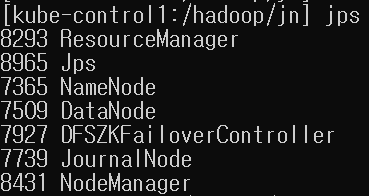
- 하둡 hdfs namenode -format 재실행하는법
6-3. /hadoop/jn/test-cluster >> test-cluster 디렉토리 지워줘야됨
6-4. 데이터 디렉토리도 초기화 시켜줘야됨 >>> cd /hadoop/data1/밑에 current 디렉토리 삭제
rm -rf /hadoop/data/*
rm -rf /hadoop/data1/*
rm -rf /hadoop/data2/*
rm -rf /hadoop/hdfs/*
rm -rf /hadoop/hdfs_work/*
rm -rf /hadoop/jn/*
- 하둡 wordcount 예제
1) hdfs 폴더 생성
hdfs dfs -mkdir -p /test

2) 테스트 데이터 생성
vi /data/test/test.txt
ab 12
cd 34
ef 56

3) 하둡에 데이터 넣기
hdfs dfs -put /data/test/test.txt /test
확인 >> hdfs dfs -cat /test/test.txt

4) 예제 실행
/data/sy0218/hadoop-3.3.5/share/hadoop/mapreduce/hadoop-mapreduce-examples-3.3.5.jar
hadoop jar /data/sy0218/hadoop-3.3.5/share/hadoop/mapreduce/hadoop-mapreduce-examples-3.3.5.jar wordcount /test/test.txt /test/result.txt