하둡, 스파크 코인 데이터 수집하기(1)
우분투에서 시간을 먼저 변경해준다( 데이터 수집 시간 데이터를 수집하기 위해)
1. 현재 시간과 날짜 표시
timedatectl >>> 역시나 서울로 안되있음 서울로 바꿔줘야됨
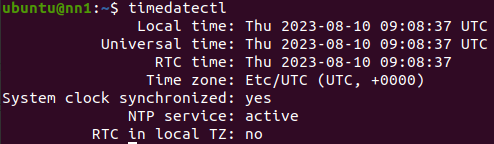
2. sudo timedatectl set-timezone "Asia/Seoul" >>> 서울로 바꿔주자
3. 변경후 timedatectl로 바뀌었는지 확인해주며됨
데이터 수집 py파일을 만들어준다
vim first_coin.py
from pyspark.sql import SparkSession
from pyspark.sql.functions import current_timestamp, year, month, dayofmonth, hour, minute
import requests

# 스파크 세션 생성
spark = SparkSession.builder \
    .master("yarn") \
    .appName("Bithumb API to CSV") \
    .getOrCreate()

# API URL
api_url = "https://api.bithumb.com/public/ticker/ALL_"

# API 데이터 요청 및 JSON 데이터 추출
response = requests.get(api_url)
data = response.json()

# data 필드에서 코인 정보 추출
coin_data = data.get("data")

# "date" 필드 제외
coin_data.pop("date", None)

# 코인 정보를 RDD로 변환
coin_rdd = spark.sparkContext.parallelize(coin_data.items())

# RDD를 DataFrame으로 변환
coin_df = coin_rdd.toDF(["Coin", "Info"])

# Info 필드를 JSON 형태의 컬럼들로 분리
for field in ["opening_price", "closing_price", "min_price", "max_price", "units_traded",
              "acc_trade_value", "prev_closing_price", "units_traded_24H", "acc_trade_value_24H"]:
    coin_df = coin_df.withColumn(field, coin_df["Info"][field])

# 불필요한 컬럼 제거
coin_df = coin_df.drop("Info", "fluctuate_24H", "fluctuate_rate_24H")

# 현재 시간과 각각의 시간 정보를 추출하여 컬럼으로 추가
coin_df = coin_df.withColumn("now_time", current_timestamp())
coin_df = coin_df.withColumn("year", year("now_time"))
coin_df = coin_df.withColumn("month", month("now_time"))
coin_df = coin_df.withColumn("day", dayofmonth("now_time"))
coin_df = coin_df.withColumn("hour", hour("now_time"))
coin_df = coin_df.withColumn("minute", minute("now_time"))

# DataFrame을 CSV 파일로 저장
coin_df.coalesce(1).write.option("header", "true").option("ignoreSuccessFile", "true").csv("coin_data.csv")

print("CSV 파일이 생성되었습니다.")

# 스파크 세션 종료
spark.stop()
spark-submit --master yarn --deploy-mode client first_coin.py >>> spark-submit 명령을 사용해 spark 애플리케이션을 실행한다
생성되었는지 확인해보자!!!
1. hdfs dfs -ls

2. hdfs dfs -ls coin_data.csv

자 그러면... 스파크로 수집해본 데이터랑 기존 csv파일과 합쳐보자.. 과연 될까.... ㅠㅠㅠ 제발
vim coin_test.py
from pyspark.sql import SparkSession
from pyspark.sql.functions import current_timestamp, year, month, dayofmonth, hour, minute
import requests

# 스파크 세션 생성
spark = SparkSession.builder \
    .master("yarn") \
    .appName("Bithumb API to CSV") \
    .getOrCreate()

# API URL
api_url = "https://api.bithumb.com/public/ticker/ALL_"

# API 데이터 요청 및 JSON 데이터 추출
response = requests.get(api_url)
data = response.json()

# data 필드에서 코인 정보 추출
coin_data = data.get("data")

# "date" 필드 제외
coin_data.pop("date", None)

# 코인 정보를 RDD로 변환
coin_rdd = spark.sparkContext.parallelize(coin_data.items())

# RDD를 DataFrame으로 변환
coin_df = coin_rdd.toDF(["Coin", "Info"])

# Info 필드를 JSON 형태의 컬럼들로 분리
for field in ["opening_price", "closing_price", "min_price", "max_price", "units_traded",
              "acc_trade_value", "prev_closing_price", "units_traded_24H", "acc_trade_value_24H"]:
    coin_df = coin_df.withColumn(field, coin_df["Info"][field])

# 불필요한 컬럼 제거
coin_df = coin_df.drop("Info", "fluctuate_24H", "fluctuate_rate_24H")

# 현재 시간과 각각의 시간 정보를 추출하여 컬럼으로 추가
coin_df = coin_df.withColumn("now_time", current_timestamp())
coin_df = coin_df.withColumn("year", year("now_time"))
coin_df = coin_df.withColumn("month", month("now_time"))
coin_df = coin_df.withColumn("day", dayofmonth("now_time"))
coin_df = coin_df.withColumn("hour", hour("now_time"))
coin_df = coin_df.withColumn("minute", minute("now_time"))

# 이전 데이터프레임 읽어오기
previous_df = spark.read.option("header", "true").csv("hdfs:///user/ubuntu/coin_data.csv/*.csv")

# 두 데이터프레임을 수직으로 합치기
merged_df = previous_df.union(coin_df)

row_count = merged_df.count()
print("numver of rows in merged_df:", row_count)

print("union출력")

# 스파크 세션 종료
spark.stop()
수직으로 합친후 데이터프레임 행을 출력하는 코드인데
정상적으로 합쳐지면 464개의 행이 출력되야됨
spark-submit --master yarn --deploy-mode client coin_test.py >>> spark-submit 명령을 사용해 spark 애플리케이션을 실행한다

오 된다된다
그러면 합친 데이터프레임 파일을 원래의 파일과 중복되면 안되므로 오버라이팅 해주자!!! 제발 되길 기도기도
오 안된다안된다
예상
os를 사용해 데이터프레임 합치고 기존 coin_data.csv 디렉토리를 삭제후 다시 생성하는 방법을 사용하였지만
Spark는 DAG(Directed Acyclic Graph) 형태로 작업을 실행하기 때문에, DAG가 실행되는 중간에 파일이나 디렉터리를 삭제하는 작업은 예기치 않은 문제를 일으킬 수 있다는 오류인거 같다...
vim coinfull_union_csv.py
from pyspark.sql import SparkSession
from pyspark.sql.functions import current_timestamp, year, month, dayofmonth, hour, minute, col
import requests
import os # os 모듈 임포트

# 스파크 세션 생성
spark = SparkSession.builder \
    .master("yarn") \
    .appName("Bithumb API to CSV") \
    .getOrCreate()

# API URL
api_url = "https://api.bithumb.com/public/ticker/ALL_"

# API 데이터 요청 및 JSON 데이터 추출
response = requests.get(api_url)
data = response.json()

# data 필드에서 코인 정보 추출
coin_data = data.get("data")

# "date" 필드 제외
coin_data.pop("date", None)

# 코인 정보를 RDD로 변환
coin_rdd = spark.sparkContext.parallelize(coin_data.items())

# RDD를 DataFrame으로 변환
coin_df = coin_rdd.toDF(["Coin", "Info"])

# Info 필드를 JSON 형태의 컬럼들로 분리
for field in ["opening_price", "closing_price", "min_price", "max_price", "units_traded",
              "acc_trade_value", "prev_closing_price", "units_traded_24H", "acc_trade_value_24H"]:
    coin_df = coin_df.withColumn(field, coin_df["Info"][field])

# 불필요한 컬럼 제거
coin_df = coin_df.drop("Info", "fluctuate_24H", "fluctuate_rate_24H")

# 현재 시간과 각각의 시간 정보를 추출하여 컬럼으로 추가
coin_df = coin_df.withColumn("now_time", current_timestamp())
coin_df = coin_df.withColumn("year", year("now_time"))
coin_df = coin_df.withColumn("month", month("now_time"))
coin_df = coin_df.withColumn("day", dayofmonth("now_time"))
coin_df = coin_df.withColumn("hour", hour("now_time"))
coin_df = coin_df.withColumn("minute", minute("now_time"))

# 이전 데이터프레임 읽어오기
previous_df = spark.read.option("header", "true").csv("hdfs:///user/ubuntu/coin_data.csv/*.csv")

# 두 데이터프레임을 수직으로 합치기
merged_df = previous_df.union(coin_df)


# 새로운 디렉토리 저장
merged_df.coalesce(1).write.option("header", "true").option("ignoreSuccessFile", "true").csv("coin_data_temp.csv")

# 기존 디렉토리 삭제
os.system("hdfs dfs -rm -r coin_data.csv")

# 새로운 디렉터리 이름 변경
os.system("hdfs dfs -mv coin_data_temp.csv coin_data.csv")

print("union출력")

# 스파크 세션 종료
spark.stop()
spark-submit --master yarn --deploy-mode client coinfull_union_csv.py
와와와 오오옹 된다!!!

디렉토리에 저장하고 >>> os를 사용해 기존 디렉토리 삭제 >>> os를 사용해 디렉터리 이름은 기존 디렉토리 명으로 변경
방법으로 해결했습니다!!!!

저장된것을 확인할수 있다!!!!!!
내일할일
1. 실행파일 1시간마다 돌아갈수있게하자
2. csv 1시간마다 몽고db에 넣어보자